The NinjaTrader SuperDOM is a point-and-click order entry tool that displays real-time depth of market (DOM) data alongside a trader’s open orders and position—allowing futures traders to place, modify, and cancel orders from a single integrated view. The SuperDOM gives traders the ability to track orders and positions in context with real-time market depth data, making it a popular order entry tool with active traders.
NinjaTrader EU is CySEC-authorised and has been providing EU traders with access to the NinjaTrader Desktop platform since January 2026. EU traders, including those in Germany, can use the SuperDOM to trade Eurex-listed contracts such as the DAX (FDAX), Micro-DAX (FDXS), Euro Bund, and major US index futures.
German futures traders researching platform-level order entry tools will find that NinjaTrader’s SuperDOM offers the same price-ladder workflow familiar from CFD platforms, with the added benefit of exchange-listed, centrally cleared futures regulated under the EU’s MiFID II framework. Learn more about why futures compare favourably to stocks or visit the NinjaTrader EU platform overview.
Watch a guided tour with actionable tips to get started on using the SuperDOM:
Learn how to navigate the NinjaTrader SuperDOM
NinjaTrader’s SuperDOM, sometimes called a price ladder or trading ladder, shows bid and ask sizes at every visible price level and supports one-click limit and stop order placement via left mouse button and center wheel button controls.
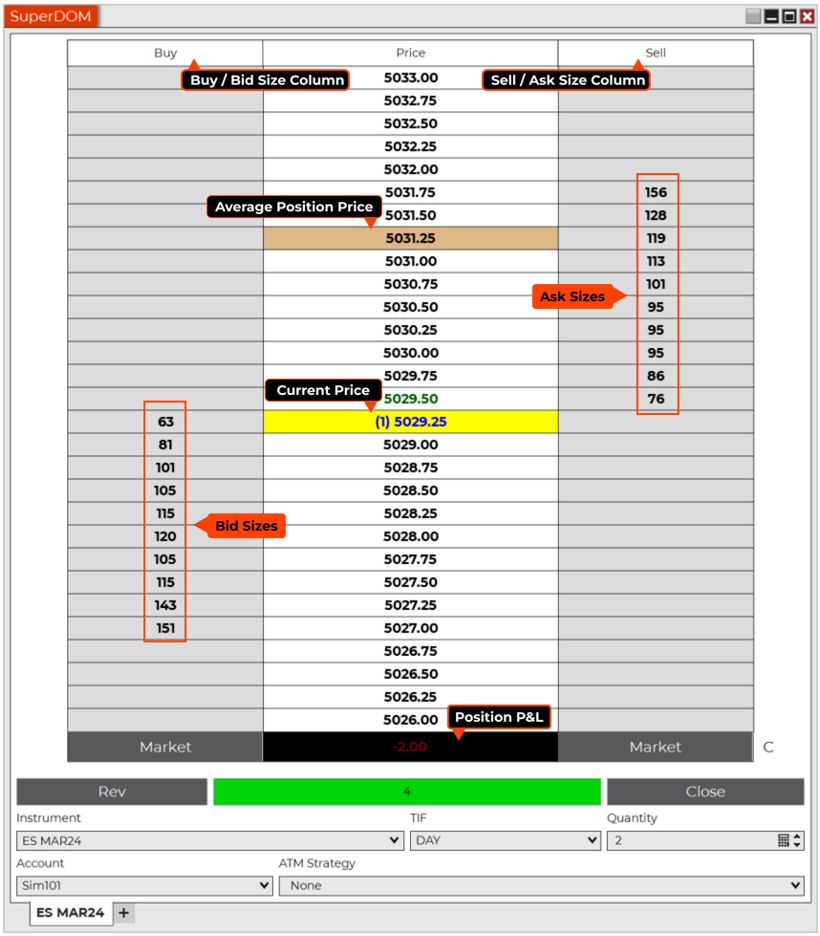
The SuperDOM consists of three real-time active order and data columns (Figure 1):
- Buy column displays the available bid size at each price
- Price column displays the:
- Last traded price with trade size (yellow)
- Average price of the open position (brown)
- Additional prices above and below the last traded price
- Inside bid price (highlighted in blue text)
- Inside ask price (highlighted in green text)
- Sell column displays the available ask (i.e., offer) size for each price
How to place a trade and specify order parameters using NinjaTrader SuperDOM
When you click to place an order in the Buy and/or Sell columns, you can specify the order parameters that will be in force at the bottom of the SuperDOM. Before placing an order, you must select:
- Instrument/symbol to trade
- Quantity of contracts
- Account
- Time in force (either a day order or GTC [good till cancel] order)
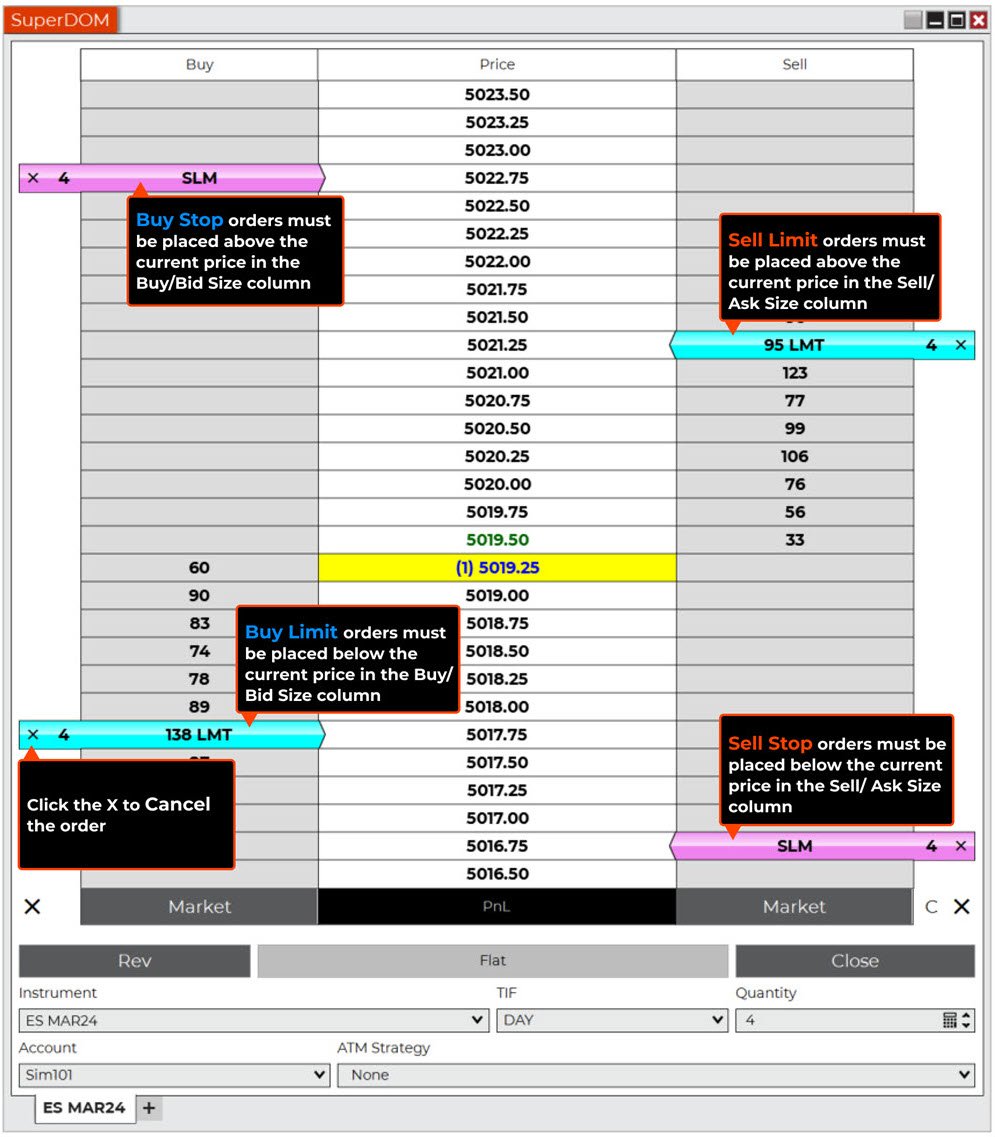
Once you’re ready to place a trade, you can use the Buy and Sell columns for point-and-click order entry. You can place limit orders and stop orders from these columns by clicking on the appropriate price cell with either the left mouse button (LMB) for limit orders or the center wheel button (CWB) for stop orders. (Figure 2)
It’s important to understand where and how to click in the SuperDOM for the exact order you wish to place. If you place orders at the wrong price level or wrong side of the ladder, it may result in your order being filled immediately.
- Buy Stop Orders: Place above the current price in Buy/Bid column (CWB)
- Buy Limit Orders: Place below the current price in Buy/Bid column (LMB)
- Sell Limit Orders: Place above the current price in Sell/Ask column (LMB)
- Sell Stop Orders: Place below the current price in Sell/Ask column (CWB)
For detailed guidance on the SuperDOM order entry interface, see the Basic Entry EU support article or the order entry hot keys reference.
How to cancel or move (cancel and replace) orders from the NinjaTrader SuperDOM
Once you place an order, you can modify or cancel it directly from the SuperDOM. To cancel an order, click on the X in the order bar. To move an order (i.e., cancel and replace), click on the order bar once to select it, and then click on a new price to modify it.
Advanced trade management strategies using the SuperDOM
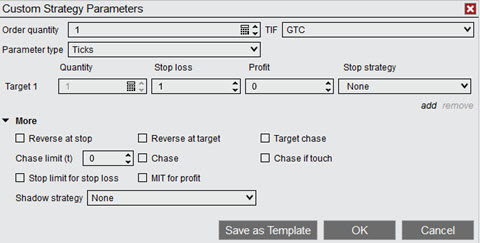
The SuperDOM integrates with NinjaTrader’s advanced trade management (ATM) strategies (Figure 3), automatically generating one-cancels-the-other (OCO) brackets and trailing stops at the moment an order is placed—supporting disciplined risk management aligned with MiFID II best execution standards. These ATM strategies are designed to help you better manage risk and provide more flexibility when placing complex orders.
How to customise the NinjaTrader SuperDOM
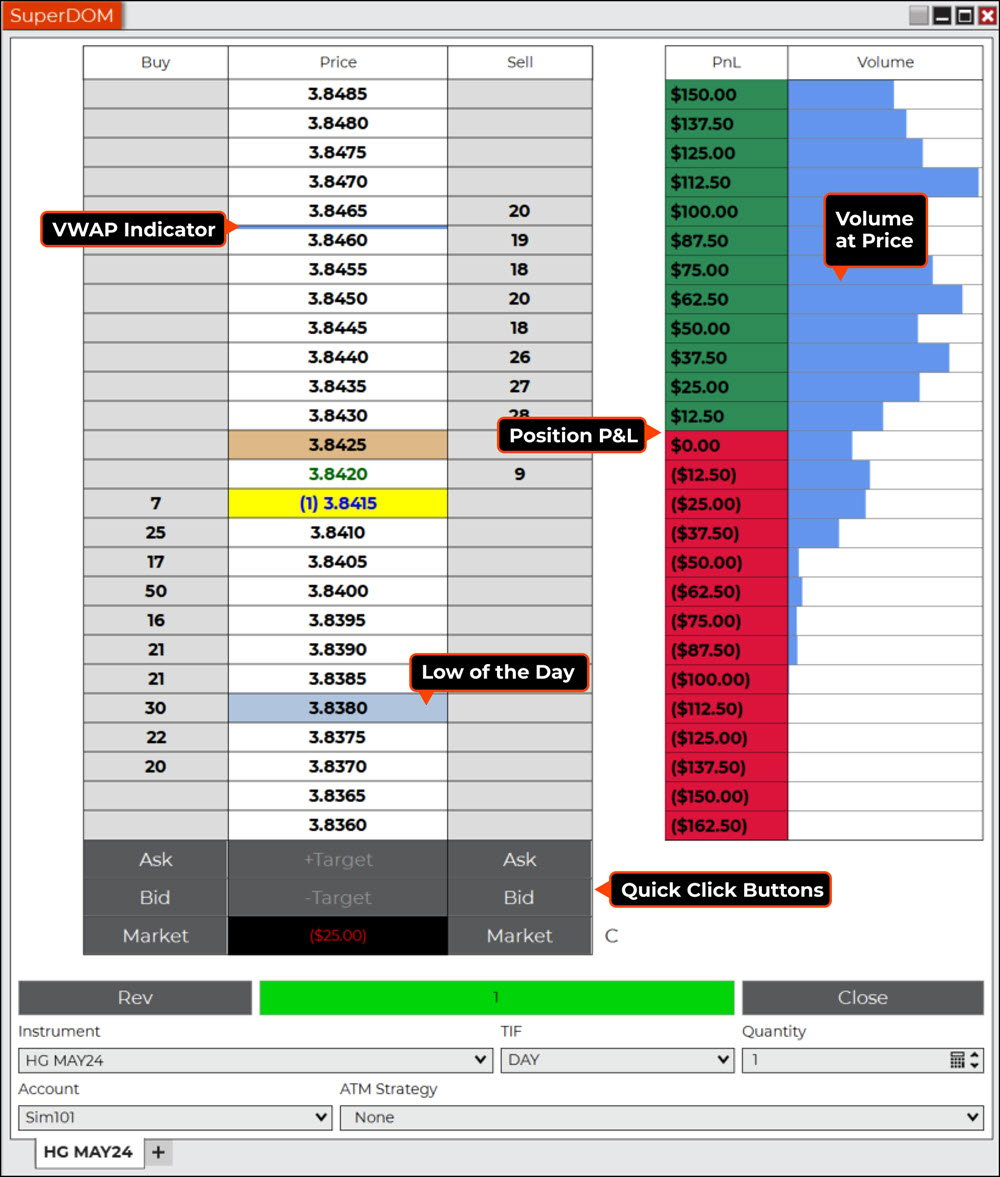
The SuperDOM is highly customisable, allowing you to add data columns that are helpful to you when trading. For example, you can add columns that show position profit and loss, volume at price profile, and even a notes column to add comments to your trading.
Additional SuperDOM customisation (Figure 4) includes the ability to add:
- Quick-click buttons for faster and more flexible order entry
- Indicator values like daily high and low markers
- Volume-weighted average price (VWAP) indicator
Using the SuperDOM offers several key benefits for active traders, including a one-window view of real-time market depth in context with your orders and positions. The SuperDOM point-and-click trading interface is fast and precise and can help you avoid costly order entry price mistakes. With the SuperDOM, traders can automatically apply risk management strategies or other complex rules when placing orders.
Take the SuperDOM for a spin
We’ve only begun to discuss some of the many features and functionality of the NinjaTrader Desktop SuperDOM. You can learn more by visiting the NinjaTrader EU platform page, and you can watch sessions on demand on our YouTube channel or on the Learn page in the NinjaTrader client portal.
Unlock free exclusive training to continue your futures trading journey
Now is the time to make the most of all NinjaTrader has to offer, including our powerful platform, sim environment, and comprehensive educational resources, including exclusive on-demand courses. Sign up for your free NinjaTrader EU account today to get started. You can also explore EU pricing or browse the how to trade futures guide to continue your journey.
Open Your NinjaTrader EU Account Today
Risk reminder: Futures trading involves substantial risk of loss and is not suitable for all investors. The SuperDOM and ATM strategies are order entry and risk management tools—they do not guarantee profits or eliminate the risk of loss. Always test order types and strategies in NinjaTrader’s sim environment before trading live. Past performance is not indicative of future results.