NinjaTrader’s mobile app provides real-time streaming futures quotes, mobile charting with dozens of technical indicators, and full account management—available to German traders through the MiFID II investment firm PEDSL-CY at ninjatrader.com/eu.
The NinjaTrader mobile app is a powerful companion to the NinjaTrader Desktop and Web trading platforms. Traders now have full access to the world of futures trading on their mobile phones and tablets and can place trades, analyse the markets, and track real-time prices from anywhere.
Real-time quotes at the touch of a finger
German traders can monitor the DAX, Euro STOXX 50, Euro Bund, and U.S. index futures directly from the NinjaTrader mobile app, with live bid/ask data, net change on the session, and open position tracking.
The Quotes view—the screen that shows your watchlists and live prices—is the control centre of the NinjaTrader mobile app, with access to real-time quotes at just the touch of your finger. It provides real-time streaming quotes with net change on the session.
At the top, you can monitor your account balance and any open position’s unrealised profit and loss. This section is organised into symbol lists by asset type, which includes stock indexes (including the DAX, Euro STOXX 50, and U.S. index futures), crypto, financials, currencies, energies, metals, and more. The menu bubbles at the top allow you to swipe left to see more asset types. Micro futures contracts are conveniently highlighted in their own list.
Creating custom favorites and rolling contracts
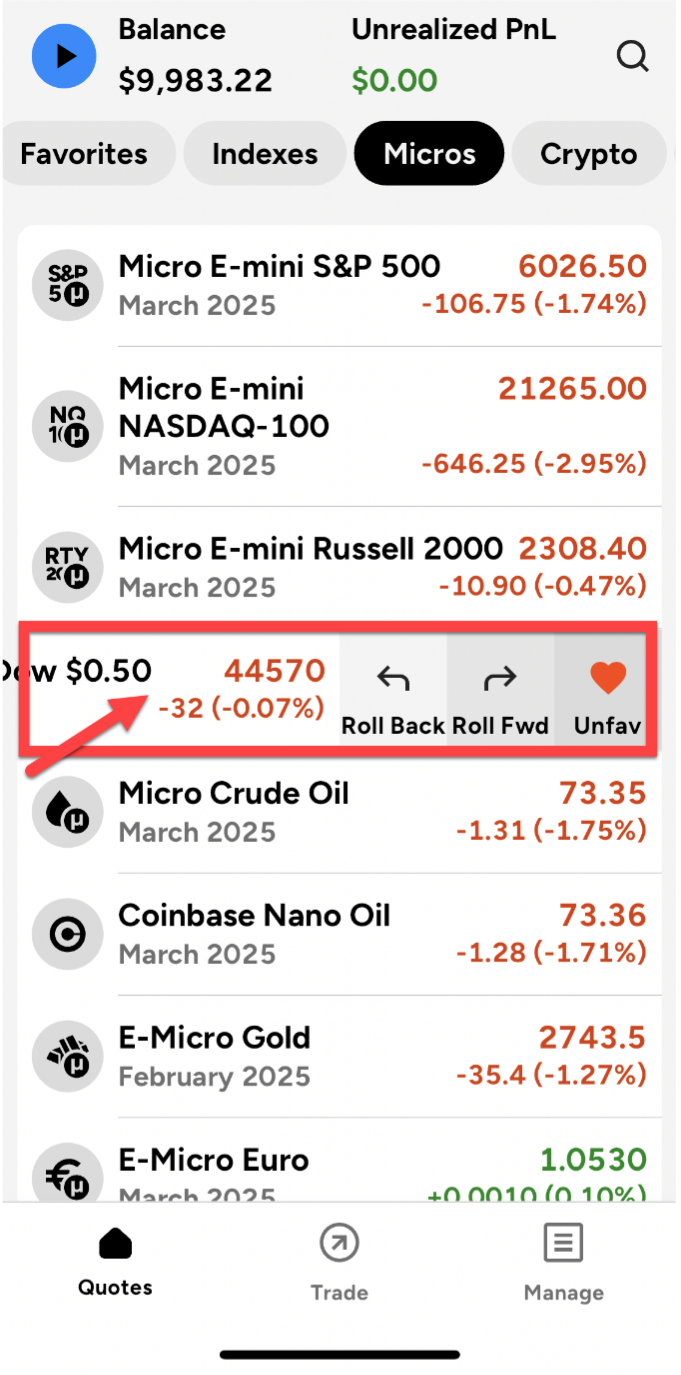
The NinjaTrader mobile app’s Quotes view organises futures contracts by asset type—stock indexes, crypto, financials, currencies, energies, and metals—and lets traders build custom Favorites lists and roll contract months forward or back.
Users can also personalise their experience by creating a custom Favorites section. Just swipe left on any quote and tap the Favorite button; it will turn red to indicate it’s been added to your Favorites list. Note that here you can also roll contract months forward and back as needed.
Tracking positions
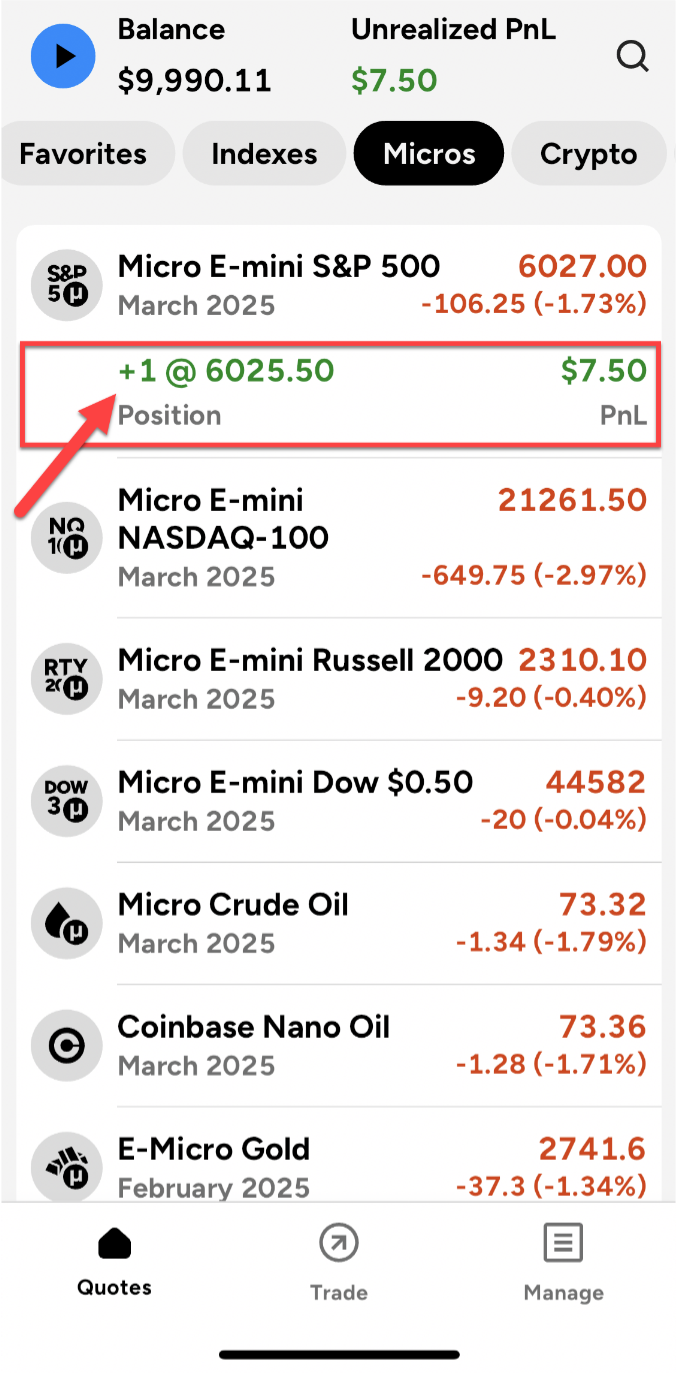
When you have an open position, the Quotes view also highlights the open position in a separate line beneath the instrument and indicates the size, direction, and entry price of the position. There can also be either a green or orange dot (or both) on top of the icon for the market. The green dot indicates the presence of a buy order, the orange dot indicates a sell order, and green and orange dots together indicate both a buy and a sell order. Your position in that market, the number of open contracts, and your unrealised open profit and loss are displayed here.
Easy and quick account management
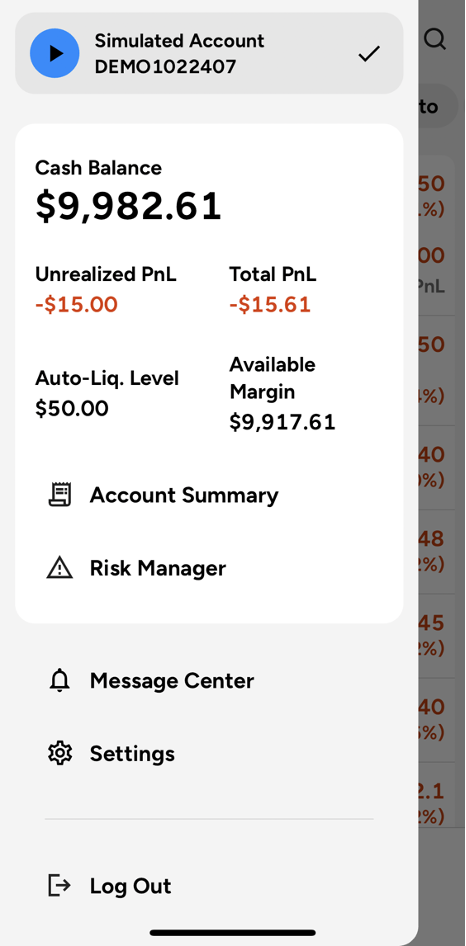
Tapping the blue circular Play button in the simulation environment or the orange square button with a black lightning bolt at the top of the mobile app will display a main account overview page along with quick links to the NinjaTrader website.
The Account Management page lists all your accounts, and you can toggle between accounts here. As an example, traders can switch from simulated to live funded accounts. Once an account is selected, it will display your cash balance, unrealised profit or loss, auto-liquidation level (the account equity level at which open positions may be closed automatically to limit further losses), and available margin.
Below are a series of quick links to the NinjaTrader website. They include Account Summary, Risk Management, Message Center, Settings, and Log Out. Depending on the size and settings of your mobile device, you may not see all of these options; simply swipe up and down on this window to see items that are not visible.
This is only blue and circular when logged into the Simulation environment. When logged into the Live environment, it is orange and square with rounded corners, and contains a black lightning bolt instead of a black triangle inside the icon.
The power of mobile charts for analysis
NinjaTrader’s mobile charting supports four chart types—candlestick, OHLC, volume profile, and line on close—with fully customisable bar intervals and dozens of built-in technical indicators, accessible from iPhone and Android.
NinjaTrader’s mobile charting gives futures traders powerful and robust technical analysis tools in a mobile app. Beyond candlestick and OHLC charts, traders can also choose volume profile (which shows the amount of volume traded at each price level) and line on close charts. Bar intervals are fully customisable, offering daily, weekly, and customisable intraday timeframes. You can also build charts based on volume activity.
The mobile app supports four chart types:
Accessing the charts
Accessing a chart is easy. From the Quotes view, simply tap on the market you want to chart, and a new window will appear with a chart.
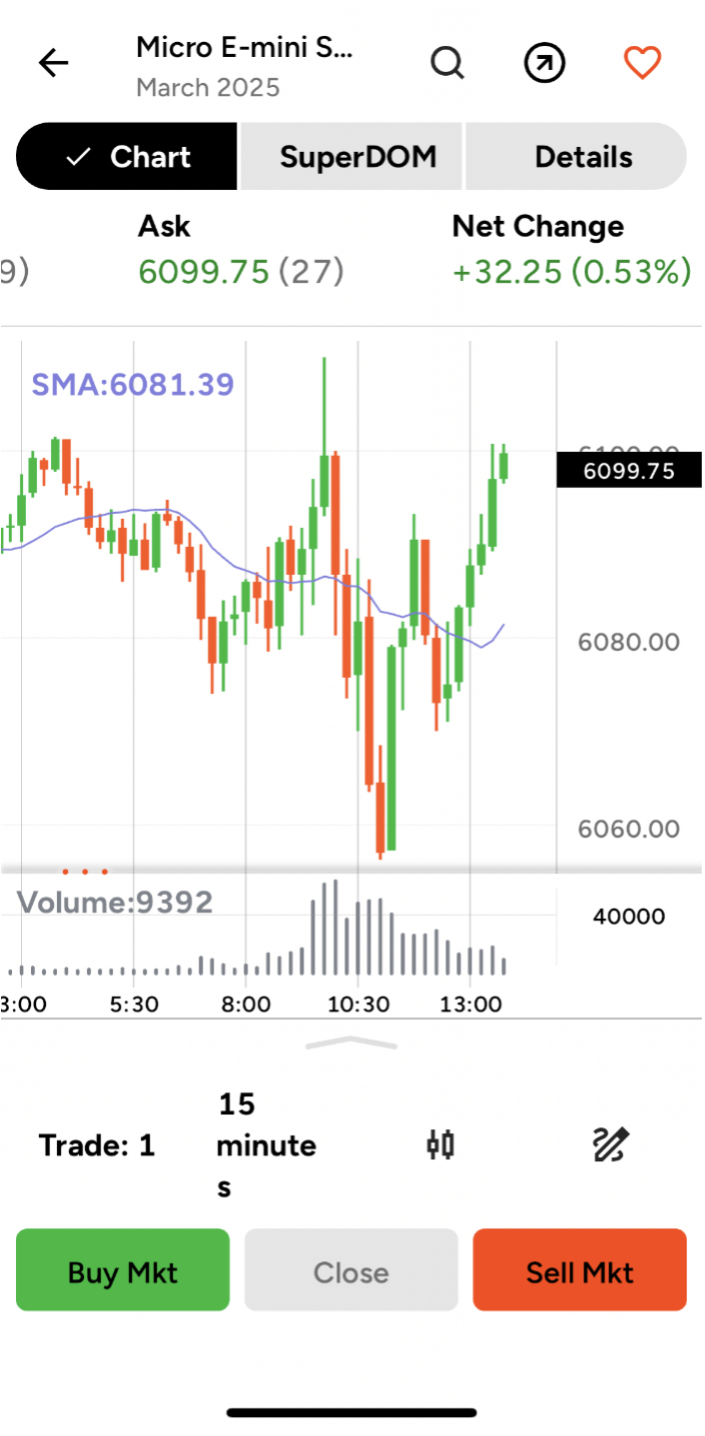
At the top of the chart, there’s a menu that includes Chart, SuperDOM (a depth-of-market ladder for viewing prices and placing orders), and Details. The default is Chart. To change the market that you want to analyse, you can do this from the chart page itself: Simply tap on the magnifying glass in the upper right and type in the market you want to view.
Real-time market information
Underneath the top menu is real-time market information including the bid, ask, net change, open, high, low, and volume. On most iPhones and Androids, you will have to swipe left with your finger to see all the data in the chart.
Trade configuration
Just under the chart, you will see four configuration buttons: Trade, Interval, Bar Type, and Indicator. Tapping the Trade button opens up a trade configuration window. Here you can change your trade size order quantity and set up automated take-profit levels, stop-loss levels, auto breakeven triggers, order duration, and trailing stop strategies.
The next option allows you to change the bar interval of your chart. You can tap here and select a standard or add a customised interval for the way you look at the markets.
Candlestick button and pencil icon
The Candlestick button allows you to change your bar type from candle to either OHLC, volume profile, or price on close.
Finally, the pencil icon allows you to add indicators into the chart. Choose from dozens of standard built-in indicators or tap into any of the advanced custom charting tools provided by third-party developers.
The NinjaTrader mobile app: a valuable trading tool
In today’s fast-moving markets and lifestyles, having a powerful and friendly trading tool like the NinjaTrader mobile app is essential. Move seamlessly between the Quotes view, account management, and charting tools. Track your positions and orders and take advantage of trading opportunities wherever and whenever they arise. When timing matters, a mobile trading companion like NinjaTrader’s can help you act on opportunities as they arise.
Download the NinjaTrader mobile app on Google Play or the App Store.

Ready to trade futures on the go? Open your account and start exploring the NinjaTrader mobile app.
Start trading today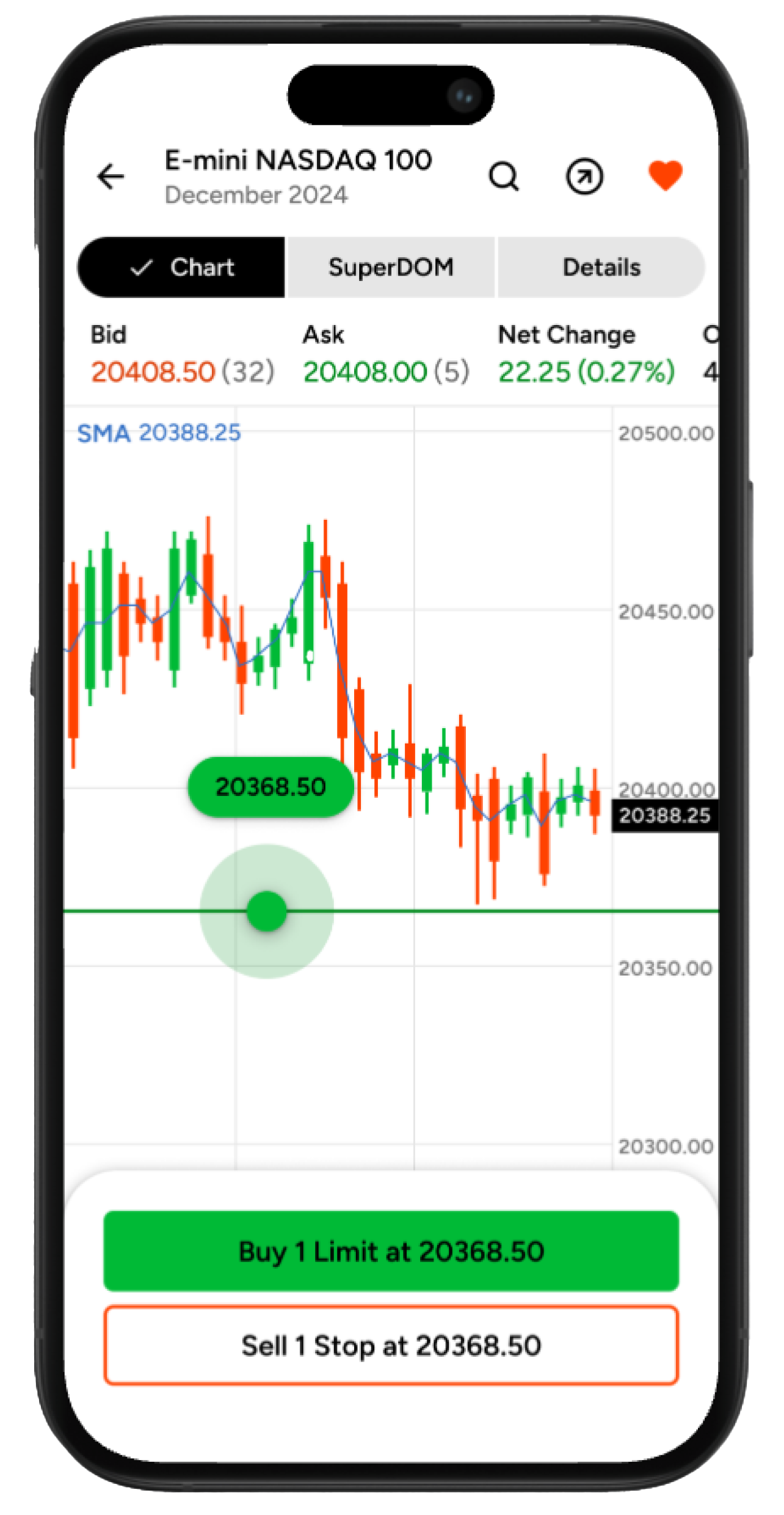
Free mobile access, no deposit minimum. All NinjaTrader plans include free mobile app access with no deposit minimum required and SEPA Instant funding available—making it an accessible futures trading platform for German traders.
FAQs on the NinjaTrader mobile app quotes view and charting
Yes. The NinjaTrader mobile app is available to traders in Germany through PEDSL-CY, NinjaTrader’s MiFID II investment firm (regulated by CySEC). You can confirm availability and open an account at ninjatrader.com/eu. German traders get access to 100+ futures contracts, including the DAX (FDAX), Euro STOXX 50, and Euro Bund, alongside U.S. index futures, with SEPA funding for deposits. See current pricing or download the app on iPhone or Android.
Yes. The app supports 100+ futures contracts, including the DAX (FDAX), Euro STOXX 50, and Euro Bund, alongside U.S. index futures.
The app supports four chart types—candlestick, OHLC, volume profile, and line on close—with fully customisable bar intervals and dozens of built-in technical indicators.
Trading derivatives and other financial instruments, including leveraged financial instruments, involves significant risks and is not appropriate for all investors. You could lose more than your initial investment. Read our risk disclosure statement to learn about the risks. Trading derivatives and other financial instruments may be subject to national restrictions and limitations.
This webpage, [www.ninjatrader.com/eu/en-de](/eu/en-de), (“Webpage”) is operated by Payward Europe Digital Solutions (CY) Limited, hereinafter “PEDSL-CY”, known as (ex I.F. Greenfields Wealth Ltd), trading hereunder and in respect of the services and derivatives made available via the Webpage as “NinjaTrader”. Investment services, ancillary services and investment activities (the “Services”) in relation to derivatives are provided and carried out by PEDSL-CY. PEDSL-CY is authorised and regulated by the Cyprus Securities and Exchange Commission (CySEC) for the provision of the Services under licence number 342/17. PEDSL-CY is registered in Cyprus with registration number HE 356603 and registered office at Athalassas, 62, MEZZANINE, Strovolos 2012, Nicosia, Cyprus. See Risk Disclosures here.
Risk Warning: These materials are for general information purposes only and are not investment or financial product advice or a recommendation or solicitation to buy or sell financial instruments or to engage in any specific trading strategy. The unpredictable nature of the derivatives markets can lead to loss of funds. Tax may be payable on any return and/or on any increase in the value of your investment and you should seek independent advice on your taxation position. Geographic restrictions may apply. See Risk Disclosures here.