Creating a customized workspace with layouts suited to your unique trading style and needs is more streamlined than ever with the NinjaTrader Desktop platform. An efficient workspace provides a view of the market with charts, quote boards, and other trading and analysis windows, all created using the NinjaTrader Control Center.
Whether you trade DAX (FDAX), Euro Stoxx 50 (FESX), or U.S. index futures, a well-organized workspace can help you stay focused and react to markets with precision.
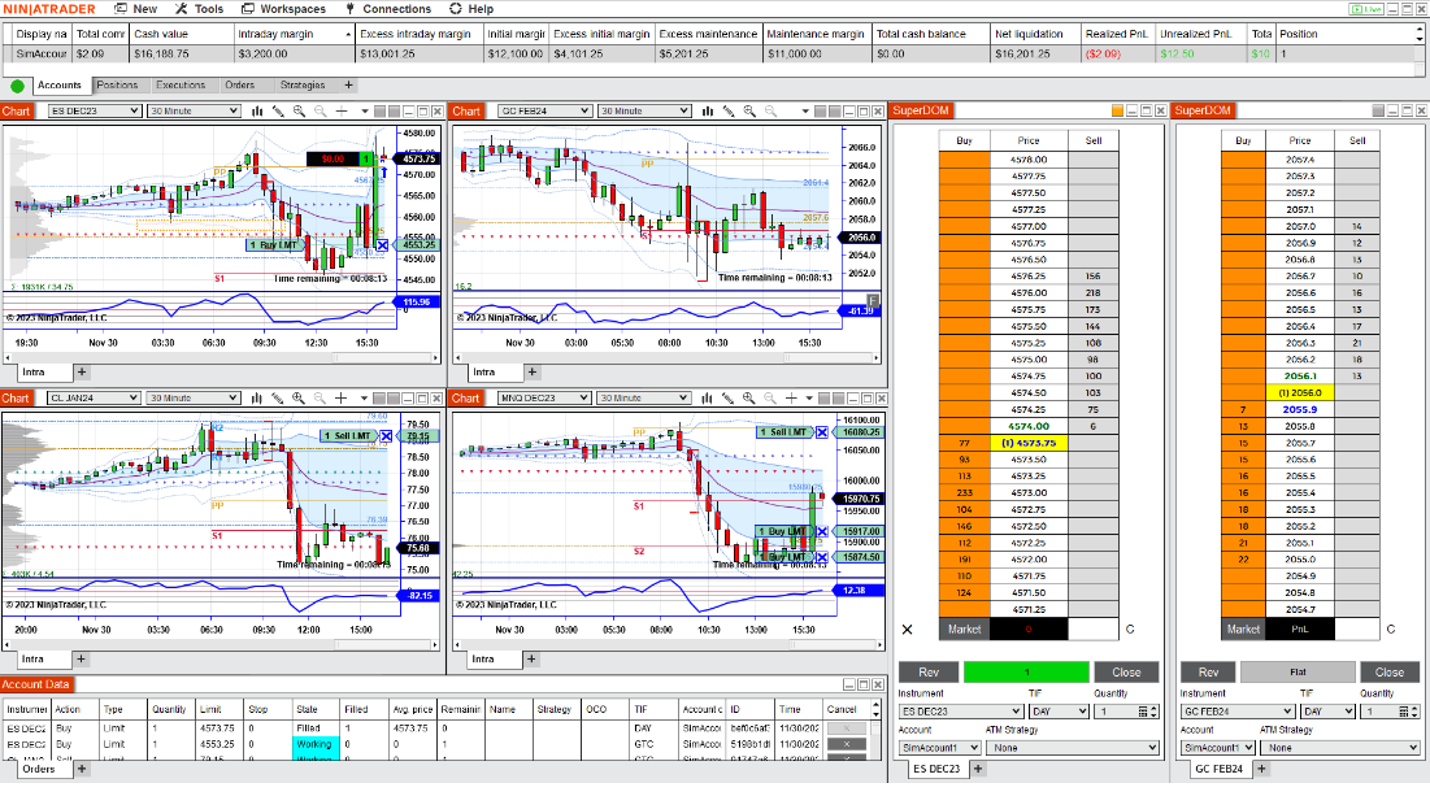
Each workspace layout is unique and contains a comprehensive set of tools to trade and analyze the markets in real time, including:
- Charts
- Market depth
- Time and sales
- Market Analyzer quote board
Traders can also design and save multiple workspace layouts and toggle between them easily as needed.
Add a Workspace Through the NinjaTrader Control Center
When you log onto the NinjaTrader platform, the Control Center automatically opens on your screen. The first default element of any NinjaTrader workspace, the Control Center provides access to all the tools you need to build your customized workspace layout. (Figure 1)
When you open the Workspaces management dialog from the top left of the Control Center, the active workspace will be highlighted. You can have multiple workspaces open at once, but only a single workspace will be active and visible at a time.
All available windows are modular and can be sized and positioned anywhere on the desktop. If you have a multi-monitor setup, you can position these tools on any of your monitors.
For a quick overview, check out our Intro to the NinjaTrader Desktop Control Center.

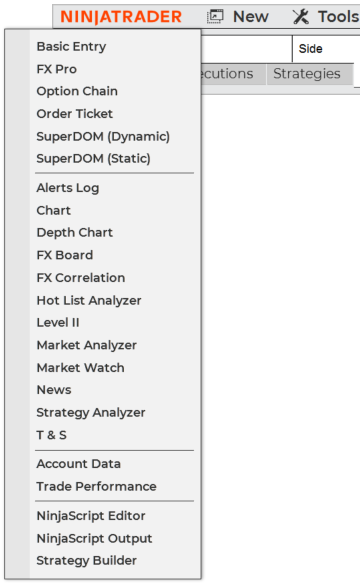
Click on the New button on the top left menu of the Control Center (Figure 2) to reveal a dropdown menu that shows all the trading and analysis windows you can add to your workspace. You can add as many instances of each element as you need (e.g., multiple price charts, multiple SuperDOMs).
How to Save Your Workspace
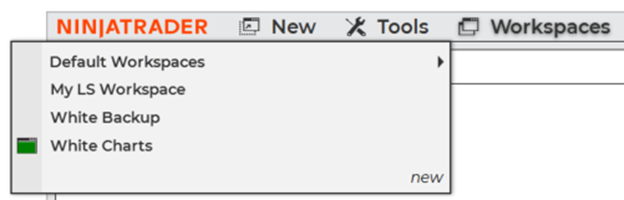
Once you’ve laid out your workspace as you want it, you can save it by going to the Workspaces management dialog from the Control Center and clicking New to capture the current layout as a new named workspace. From here, you can select your saved workspaces or access the pre-installed default workspaces. (Figure 3)
For full details on creating and managing workspaces, see the NinjaTrader Desktop Workspaces support article.
Accessing the Market Analyzer (Quote Board)
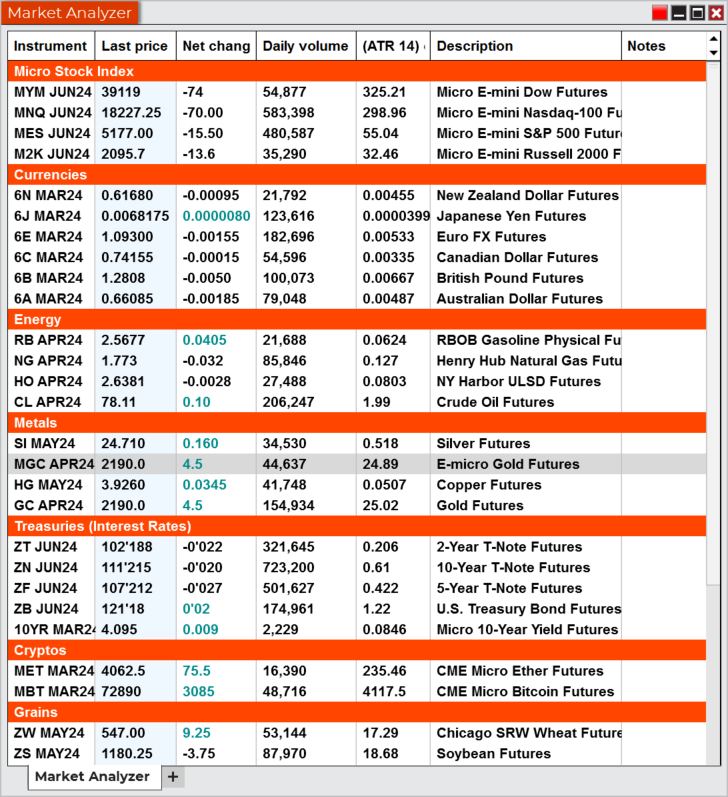
One of the most utilized workspace elements is the Market Analyzer, which you can think of as a supercharged quote board. Select Market Analyzer in the New dropdown menu to launch a window that enables you to create and customize a symbol watch list.
A typical Market Analyzer will include the last traded price, bid and offer, volume, and daily percentage change. It can also include technical indicators and can set alerts and track real-time P&L on all your positions. (Figure 4)
Customizing Your NinjaTrader Chart View
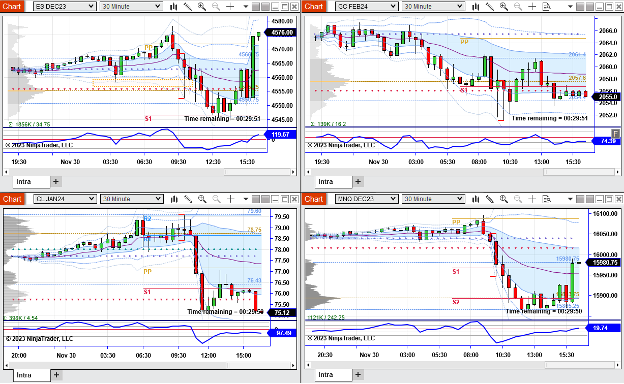
NinjaTrader’s powerful, full-featured price charts allow you to visualize market data at any bar interval, over any historical timeframe. They also allow you to tap into the universe of real-time technical indicators. (Figure 5)
To modify and customize the look of your chart (e.g., colors, lines, fonts), right-click inside the chart window and select Properties. Select Data Series to set the chart style, bar interval, and amount of historical data to load.
How to Add the SuperDOM to Your Workspace
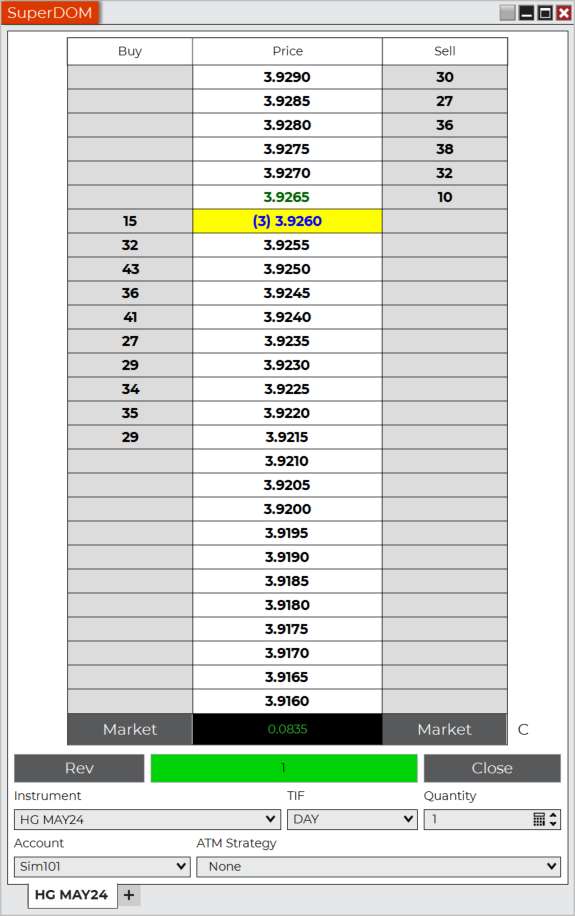
The NinjaTrader SuperDOM (i.e., trading ladder) is a common workspace order entry tool for traders. This click-and-trade order entry tool makes it fast and direct to place trades in the market and can help you avoid costly order entry mistakes.
With the SuperDOM, you can see all your order and position information in context with real-time market data and Level II information. You can place a buy or sell order, cancel an active order, and more with just one click. (Figure 6)
Customize Your Trading with the Control Center
Regardless of your experience level or the markets you trade, having a customized workspace can help you trade futures in a way that works for you. This can make it easier and more efficient to place trades, monitor your trading, track market prices, and analyze the markets—which are all important for many active traders.
Learn more about how to create and manage workspaces in the NinjaTrader Desktop platform in the NinjaTrader Desktop Workspaces support article.
Ready to build your workspace?
New to futures trading? Visit ninjatrader.com/eu/en-de/ to learn more, or explore futures vs. forex and CFDs to understand the advantages of trading futures.
Open Your NinjaTrader AccountFrequently Asked Questions About NinjaTrader Workspaces
A NinjaTrader Desktop workspace is a fully customized layout of trading and analysis windows—charts, the Market Analyzer (a real-time quote board), the SuperDOM order entry tool, and other windows—all organized and launched from the Control Center. You can size and position each window anywhere on your screen, and add multiple instances of the same tool (e.g., separate charts for different instruments) as needed.
Yes. The NinjaTrader Desktop lets you save as many workspace layouts as you need and switch between them from the Workspaces management dialog in the Control Center. Only one workspace is active and visible at a time—so you could run a DAX futures setup on one layout and a U.S. index futures setup on another, switching between them in seconds.
The SuperDOM is a depth-of-market order entry tool integrated directly into the Desktop workspace. It displays real-time Level II market data alongside your live orders and positions, so you can place, modify, or cancel orders with a single click—without losing sight of the market. See the SuperDOM support article for full details on placing orders.
The Market Analyzer is NinjaTrader’s customizable quote board within the workspace. It displays real-time prices, bid/ask spreads, volume, and technical indicators across multiple futures instruments simultaneously—including FDAX, FESX, and U.S. index futures—in a single, at-a-glance window. You can also set price alerts and track real-time P&L on open positions. Learn more in the Market Analyzer support article.
Yes. NinjaTrader Desktop supports multi-monitor configurations, so you can spread workspace components—charts, quote boards, and order windows—across multiple screens for a fully organized trading environment. Every workspace window is modular and can be positioned on any monitor in your setup independently.
Yes. European index futures such as the DAX (FDAX) and the Euro Stoxx 50 (FESX) can be added to your Market Analyzer, charts, and SuperDOM alongside U.S. contracts. Learn more on the NinjaTrader EU platform page.
Trading derivatives and other financial instruments, including leveraged financial instruments, involves significant risks and is not appropriate for all investors. You could lose more than your initial investment. Read our risk disclosure statement to learn about the risks.
Trading derivatives and other financial instruments may be subject to national restrictions and limitations.
This webpage, www.ninjatrader.com/eu/en-de, (“Webpage”) is operated by Payward Europe Digital Solutions (CY) Limited, hereinafter “PEDSL-CY”, known as (ex I.F. Greenfields Wealth Ltd), trading hereunder and in respect of the services and derivatives made available via the Webpage as “NinjaTrader”.
Investment services, ancillary services and investment activities (the “Services”) in relation to derivatives are provided and carried out by PEDSL-CY. PEDSL-CY is authorised and regulated by the Cyprus Securities and Exchange Commission (CySEC) for the provision of the Services under licence number 342/17. See Risk Disclosures here. PEDSL-CY is registered in Cyprus with registration number HE 356603 and registered office at Athalassas, 62, MEZZANINE, Strovolos 2012, Nicosia, Cyprus.
Risk Warning: These materials are for general information purposes only and are not investment or financial product advice or a recommendation or solicitation to buy or sell financial instruments or to engage in any specific trading strategy. The unpredictable nature of the derivatives markets can lead to loss of funds. Tax may be payable on any return and/or on any increase in the value of your investment and you should seek independent advice on your taxation position. Geographic restrictions may apply. See Risk Disclosures here.