Support and resistance levels are price areas where a market has repeatedly paused or reversed, and traders mark them on a chart to help plan entries, exits, and stop placement. In NinjaTrader’s desktop platform, traders can mark them with the Horizontal Line drawing tool, or plot prior-session levels automatically with indicators such as Prior Day OHLC and Pivots.
A chart can fill up with lines fast, and most of them won’t earn a second look. This guide covers how to spot levels, how to draw them, which session levels many futures traders add, and how to tell which ones deserve your attention. The examples use E-mini S&P 500 (ES) and E-mini Nasdaq-100 (NQ) charts.
Any trading symbols, company names, logos, or trademarks displayed are used for illustrative purposes only and remain the property of their respective owners. Their use does not imply affiliation with, endorsement by, or sponsorship of NinjaTrader, nor do any trading symbols displayed constitute investment advice or recommendations.
What are support and resistance levels?
Support is a price area where buying interest has tended to slow or stop a decline. Resistance is the mirror image: a price area where selling interest has tended to slow or stop an advance.
Support and resistance are usually treated as zones rather than exact prices. Price might stall a few ticks short of a level, push through it briefly, and return, and any of those can happen at the same spot. A level that breaks can also reverse roles, with former support acting as new resistance. That switch is called role reversal.
Support and resistance are usually treated as zones rather than exact prices.
Why traders cluster around the same prices in the first place has its own explainer, how trader dynamics shape key support and resistance levels. This guide stays on the practical side: finding and marking the levels.
How do you spot support and resistance levels on a price chart?
To spot support and resistance levels on a price chart, start with the price action itself, before any indicator goes on the chart. Three habits cover most of it.
To spot support and resistance levels on a price chart, start with the price action itself, before any indicator goes on the chart.
Mark swing highs and swing lows
A swing high is a bar whose high sits above the highs of the bars on either side of it. A swing low is the reverse: a bar whose low sits below the lows of its neighbors. Zoom out until the turns that matter stand out, then mark the ones that led to a clear move away from that price.
Look for repeated reactions
A price area that has turned the market more than once is a better candidate than a one-time turn. Check the history to the left of your chart: if price has stalled, reversed, or bounced near the same area at different times, that area earns a mark. If a broken level starts acting from the other side, that is role reversal in action.
Notice round numbers
Round numbers, such as a full hundred-point mark on ES, can draw attention because orders can cluster there. They are worth a look, but a round number with no reaction history behind it is a weak candidate on its own.
What it meansA level is a zone with a history. If price has reacted there more than once, mark it. If price has only touched it once, make a note and wait.
Drawing them takes only a few clicks.
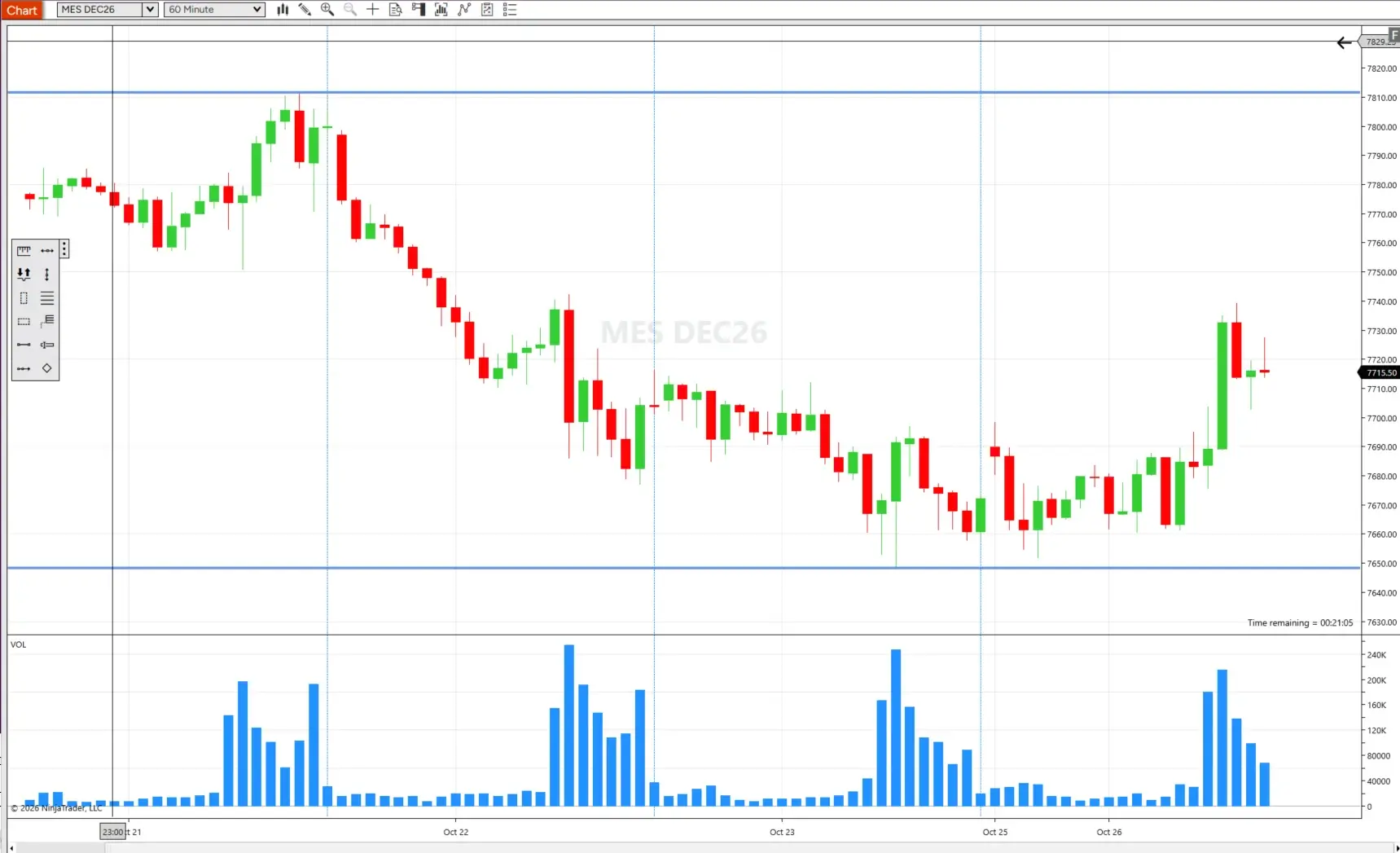
How do you draw support and resistance with just horizontal lines in NinjaTrader?
Horizontal lines alone can give you a usable map of a chart, and the Horizontal Line drawing tool is a direct way to build one.
You can put a line on the chart in NinjaTrader in four steps:
- Open a chart of the contract you trade, such as ES, on the timeframe you plan to read.
- Right-click the chart and choose Drawing Tools, or open them from the toolbar, then select Horizontal Line. The default hot key is F6.
- Click the chart at the price you want to mark.
- Repeat for your other levels, then lock the ones you rely on so a stray click doesn’t move them.
For every setting and option, see the full drawing tools reference. The rest of this section covers the decisions that reference doesn’t make for you.
Choose a line or a zone
A line implies a precise price. Use a line when price has reacted at nearly the same spot each time. When reactions are scattered across several ticks or a few points, shade the band instead with the Region Highlight tools, which cover horizontal or vertical regions of the chart. A zone matches how levels tend to behave, and it spares you the argument over whether a bar that poked one tick through a line has “broken” it.
Pick the swing you anchor to
Decide what you anchor to and stay consistent. If you draw one level to the wick of a swing high and the next to the body of a different bar, the levels won’t compare cleanly later. Anchoring to where price actually reacted, usually the extreme of the swing, keeps your marks comparable from chart to chart.
Decide where each line lives
A drawing object in NinjaTrader’s desktop platform can apply to one chart (local) or to every chart of the same instrument (global). A level from a daily chart that you want visible on your five-minute chart is a good candidate for global. A line that only matters for today’s session can stay local. Removing a global line removes it from all of those charts, so clear them deliberately. A short list of lines you can explain beats a crowded chart you have to decode every morning.
Lines you draw cover the levels you spot yourself. Session levels add a second layer.
How do you mark previous-day highs and lows and other session levels?
Many futures traders begin each session with a short list of levels from the prior day or the first stretch of today’s session. Some plot automatically, and others take two lines to draw.
Many futures traders begin each session with a short list of levels from the prior day or the first stretch of today’s session.
Previous-day open, high, low, and close
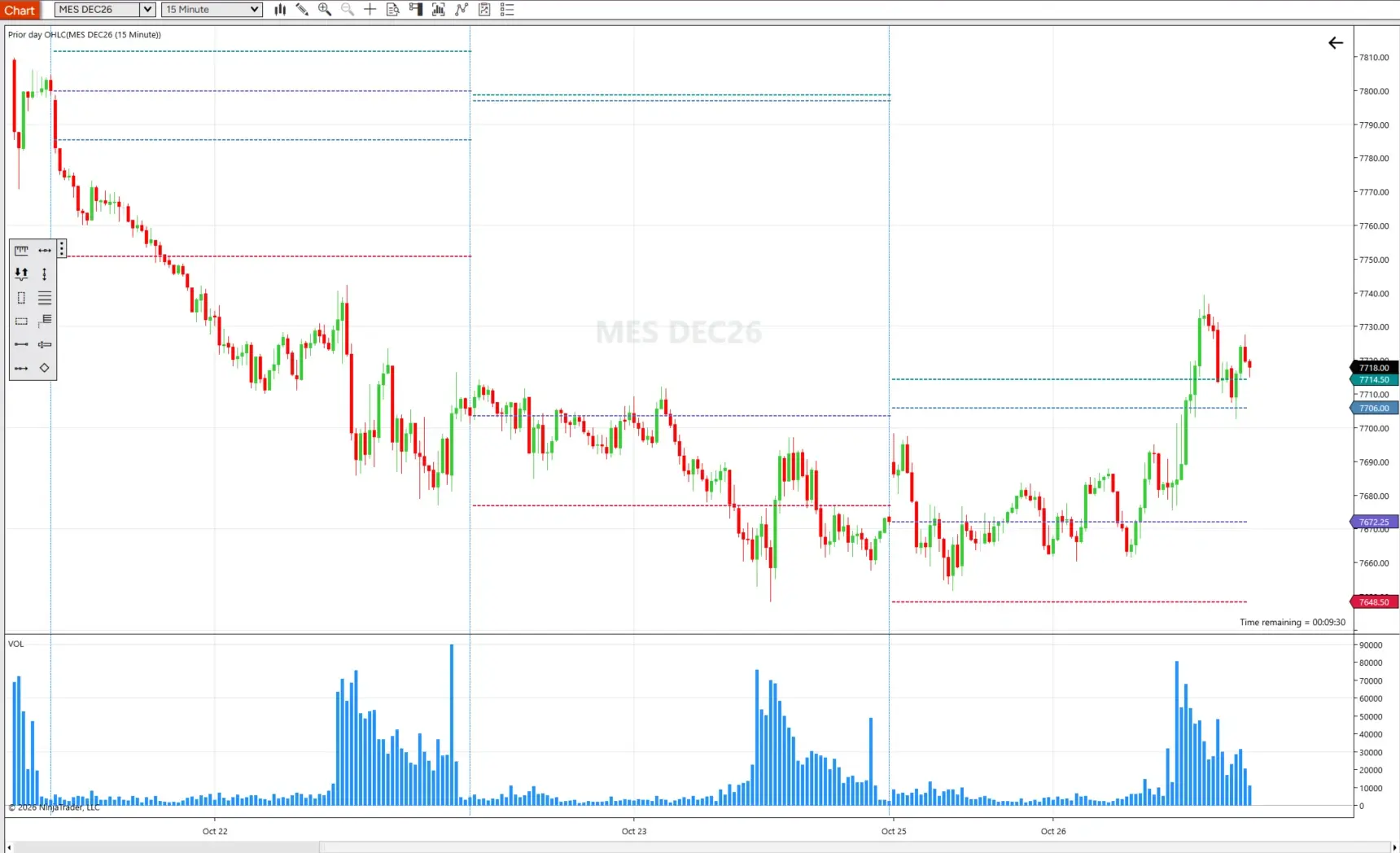
The Prior Day OHLC indicator plots the prior session’s open, high, low, and close on an intraday chart, and you can format each level to suit your template. Yesterday’s high and low are among the first prices many traders mark, since they can watch how price behaves around them early in the next session.
Pivots
A pivot point is a reference level calculated from the prior day’s prices. The Pivots indicator plots seven levels calculated from the prior day’s high, low, and close, and it is one of the 100+ technical indicators included in NinjaTrader’s desktop platform. Treat pivots as places to watch how price reacts, not as forecasts. The pivot points deep dive covers the calculation and how traders use the levels.
Opening range
The opening range is the high and low of the first stretch of the session, commonly the first 30 minutes. Two Horizontal Lines at those prices give you a pair of levels that can matter for the rest of the day. The opening range breakout strategy guide walks through that setup.
VWAP bands with Order Flow+
Volume-weighted average price (VWAP) is the average price of a session weighted by volume. With Order Flow+, NinjaTrader’s premium add-on feature set, VWAP can be plotted with standard deviation bands, which some traders watch as support and resistance that moves through the session. If you want the full picture, see these VWAP strategies for futures.
Volume profile can add one more view by showing where trading concentrated at each price. The volume profile guide explains how to read it.
Here is how the methods compare:
| Method | What it marks | Manual or automatic | When it tends to help |
|---|---|---|---|
| Horizontal Line | Any price you choose, such as a swing high or low | Manual | Marking levels you spot yourself, including ones from higher timeframes |
| Prior Day OHLC | The prior session’s open, high, low, and close | Automatic | Giving each intraday session a quick reference map |
| Pivots | Seven levels calculated from the prior day’s high, low, and close | Automatic | Adding calculated reference levels around prior-day prices |
| Opening range | The high and low of the first 30 minutes | Manual (two Horizontal Lines) | After the opening period, when traders watch the edges for reactions |
| VWAP bands (Order Flow+) | VWAP and standard deviation bands | Automatic (premium add-on) | Tracking where price sits relative to the session’s volume-weighted average |
For a wider look at what day traders put on their charts, see this roundup of the indicators day traders use for futures.
Stack all of that on one chart and the next problem is having too many levels.
How do you tell which levels matter on an ES or NQ chart?
Futures traders commonly mark these levels on liquid contracts such as ES and NQ, then watch how price reacts when it reaches them. Two things can help you sort the levels that deserve attention from the ones that don’t.
Futures traders commonly mark these levels on liquid contracts such as ES and NQ, then watch how price reacts when it reaches them.
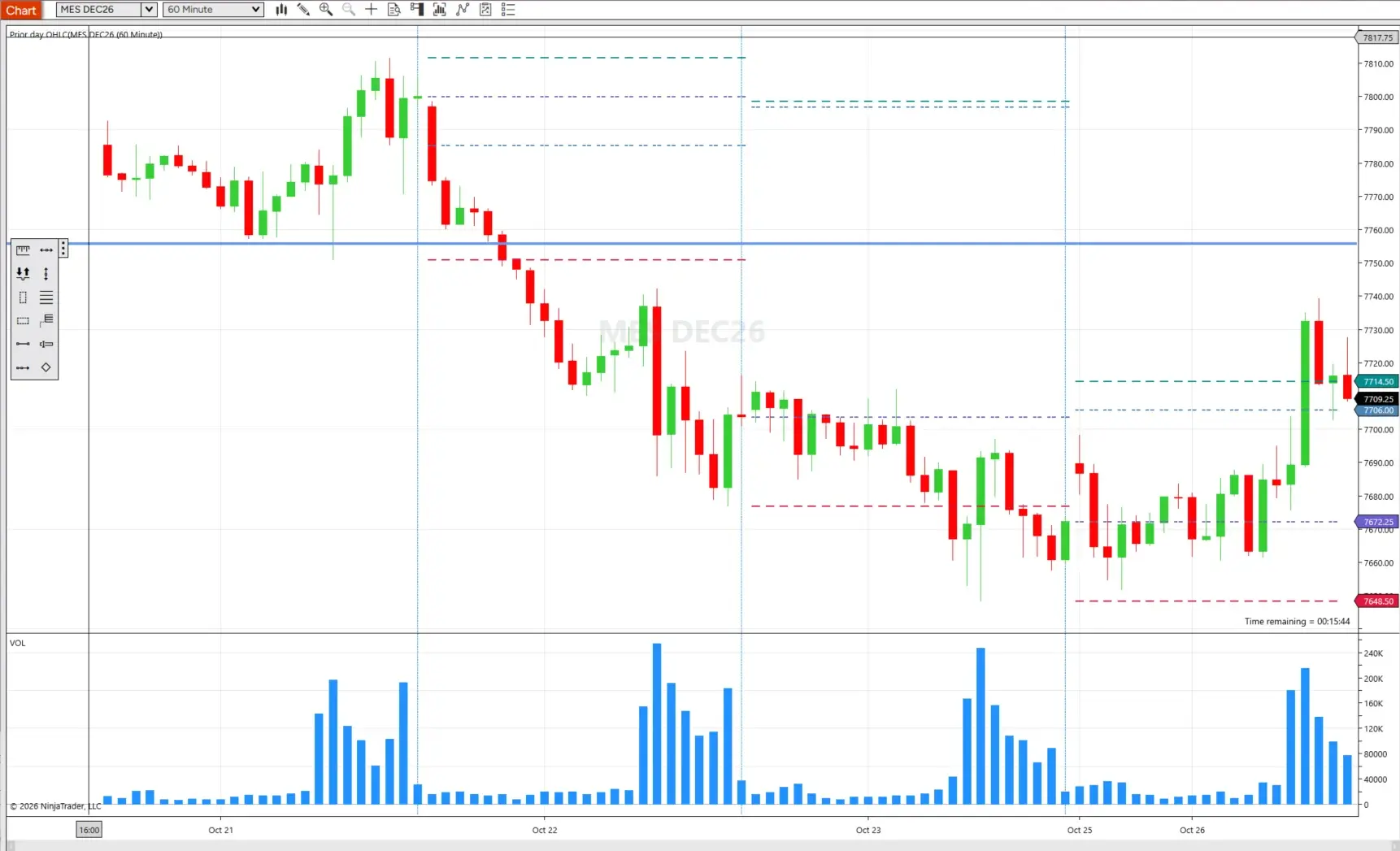
Look for confluence
Confluence is when levels from different methods, such as a prior-day high, a pivot, and a VWAP band, land in the same area. Traders often treat that area as a stronger level of potential support or resistance. VWAP bands need Order Flow+, so swap in another method, such as a swing high, if you don’t use it.
Give higher timeframes more weight
A level from a daily chart carries more history than one from a five-minute chart, which is why many traders mark the higher-timeframe levels first and then zoom in. The top-down analysis guide shows how that approach works across timeframes.
A worked example on ES
Say you’re preparing for an ES session and you’ve marked three things before the open: yesterday’s high at 6,850.00 from Prior Day OHLC, a Pivots level at 6,848.50, and a swing high from last week near 6,851.00.
Note: These prices are illustrative and aren’t taken from a live chart.
The three levels sit within about two and a half points of each other, so you shade one band from 6,848.50 to 6,851.00 and treat it as a single resistance zone instead of three separate lines. Then you decide in advance what you’ll watch for when price gets there. Bars that stall and close back below the zone may suggest sellers are defending it. Bars that close above it may signal the zone has switched roles and could act as support on a pullback. Either reaction can inform where you place a stop or whether you stand aside.
The same steps work on NQ. The levels sit at NQ’s own prices, and the sorting works the same way.
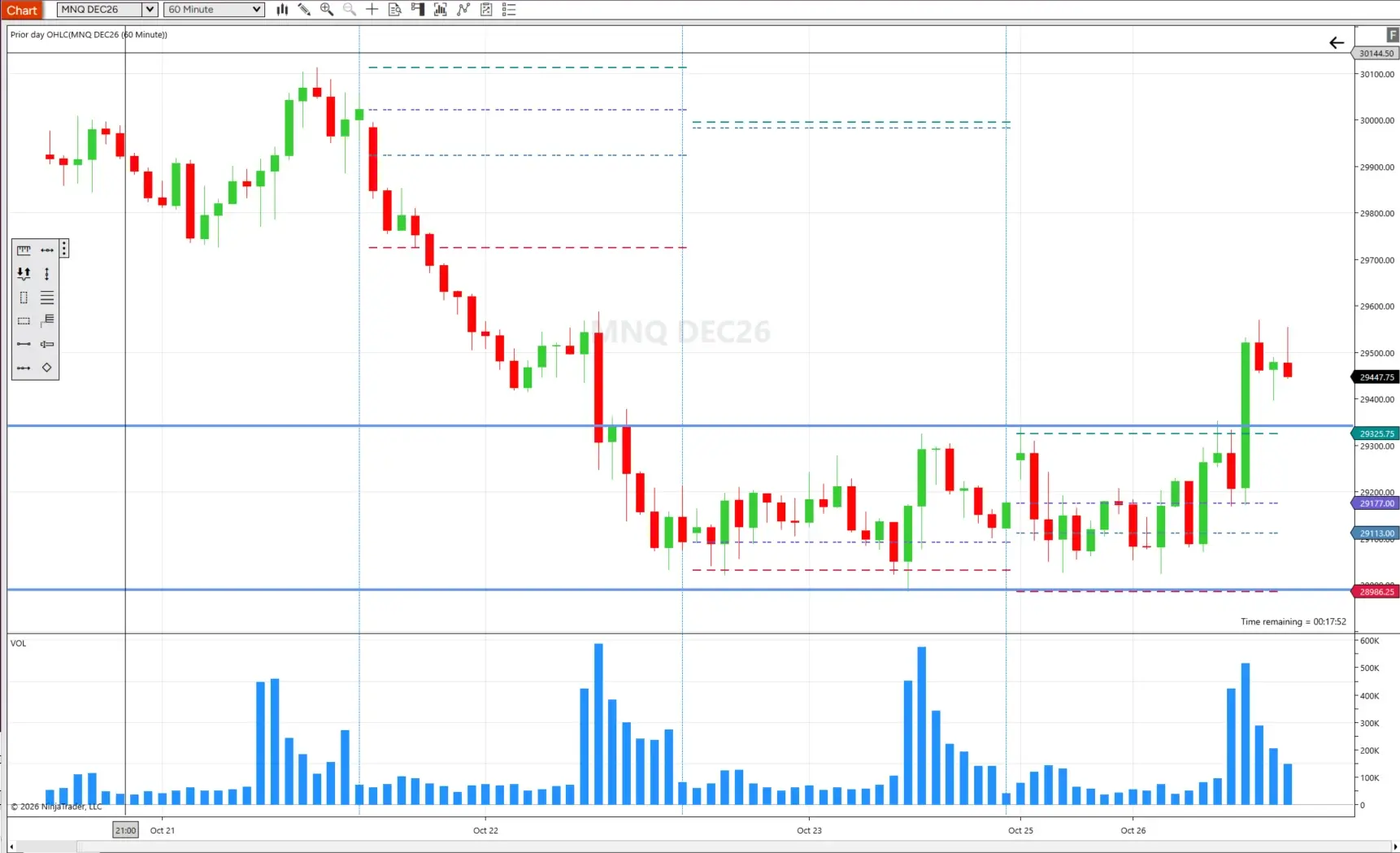
What it meansThe overlap is the point. Three modest levels in one place can deserve more attention than a single level standing alone.
The built-in tools aren’t the only way to find levels, and some traders add outside indicators to the mix.
Can third-party indicators help you find support and resistance?
Third-party indicators can add methods beyond the platform’s built-in tools. Third-party indicators and apps are built for NinjaTrader’s desktop platform by developers outside NinjaTrader, and each one defines its own approach to the chart.
Third-party indicators and apps are built for NinjaTrader’s desktop platform by developers outside NinjaTrader, and each one defines its own approach to the chart.
The NinjaTrader Ecosystem vendors featured are independent of NinjaTrader, LLC and its affiliated companies (“NinjaTrader”). NinjaTrader does not endorse or recommend any particular trading system or strategy.
If you try one, check how it defines a level, whether it repaints (redraws past levels after the fact), and how its levels compare with the ones you’ve drawn by hand. Because each tool is built by its own developer, definitions differ, and a level from one indicator may not match a level from another. Treat the output as one more input in your confluence check, not a replacement for your own read of the chart.
Start marking levels in NinjaTrader
Pick one contract (such as ES or NQ), mark the levels that stand out on a higher timeframe, add Prior Day OHLC or Pivots, and see where your zones overlap. To build the fundamentals first, NinjaTrader’s Technical Analysis Made Easy course covers technical analysis basics, and accessing it requires a NinjaTrader account.
Ready to try it on your own charts?
Terms apply.
FAQs on identifying support and resistance levels
What’s the difference between support and resistance?
Support is a price area where a decline has tended to slow or stall, and resistance is a price area where an advance has tended to do the same. The two can swap: when price breaks through resistance and holds above it, that former resistance may later act as support.
Are support and resistance exact prices or zones?
Support and resistance are usually zones. Price often reacts a few ticks short of a marked level or trades through it briefly before reversing, which is why many traders shade a band instead of drawing a single line.
How many times does a level need to be tested?
No set number applies. A level that price has respected more than once is a stronger candidate than a one-time turn; but repeated tests can also wear a level down, so watch the reaction at each test instead of counting touches alone.
Can you mark support and resistance without indicators?
Yes. Swing highs, swing lows, and round numbers can all be marked with the Horizontal Line drawing tool alone. Indicators such as Prior Day OHLC and Pivots add automatic session levels on top of those lines.
Which timeframe should you start on?
Many traders start on a higher timeframe, such as a daily chart, to mark the levels with the most history, then move to the timeframe they trade, such as a five-minute chart. Levels that show up on both views tend to carry more weight.