Ask any futures trader who’s been around for a while what their secret for success has been, and there’s a high probability they will answer, “I follow a strict risk management routine on every trade.” Protecting your available capital to trade is paramount—you can’t trade if you wipe out your account. That’s why it’s important to build and follow a consistent risk management plan when trading futures.
Due to the increased leverage available through futures, even small price movements can result in significant profits or losses. Being aware of the potential risk is only the start. Traders can help better manage and mitigate their exposure by following a consistent disciplined approach by learning how to manage risk in futures trading.
Risk management in futures trading is the practice of deciding how much you can afford to lose before you enter a trade, then building rules that hold you to it. It works on two levels. Account-level limits help define thresholds for what a single day or week can cost you. Trade-level controls—stop-loss orders and position sizing—are how you decide what any one position can cost you, and per-trade alerts tell you when you’ve hit a line you set.
Loss limits and stop-market orders are liquidation triggers, not guaranteed caps. When a limit is reached, a market order goes out to close your open positions, and slippage in fast markets can leave you with a realized loss larger than the limit you set.
Account-level risk settings
It’s easy for a trader to get too caught up in the action by chasing more profits or trying to recover losses. This overtrading is often caused by a lack of discipline that can lead to bad results. While building an effective futures trader’s mindset can help, experienced traders also know it’s good practice to set daily or weekly limits that lock in a profit or limit further losses. Once you’ve reached your profit goal, lock it in and take the win.
NinjaTrader offers account-level risk settings that can automatically liquidate positions daily or weekly once a profit trigger or loss limit is reached. There’s also trailing max drawdown, which follows your highest account balance—as your balance grows, the level that triggers a liquidation rises with it. Trailing max drawdown comes in two versions: end-of-day, which recalculates once at session close, and real-time, which tracks continuously and counts unrealized profit and loss on open positions.
Daily and weekly limits release on their own: 5:00 pm CT that day, or 5:00 pm CT Sunday. A trailing max drawdown lock doesn’t; you’ll need to contact support to have the account unlocked. You can also cap how many positions you hold at once. With Max Number of Open Positions set, any order that would open an additional position is rejected until you close one you already have.
Manage your risk settings from your NinjaTrader Dashboard (user profile button, upper-right > Settings > Accounts > Risk Settings) or in NinjaTrader Web, by selecting the shield icon at the bottom of the right-hand navigation menu. (Figure 1)
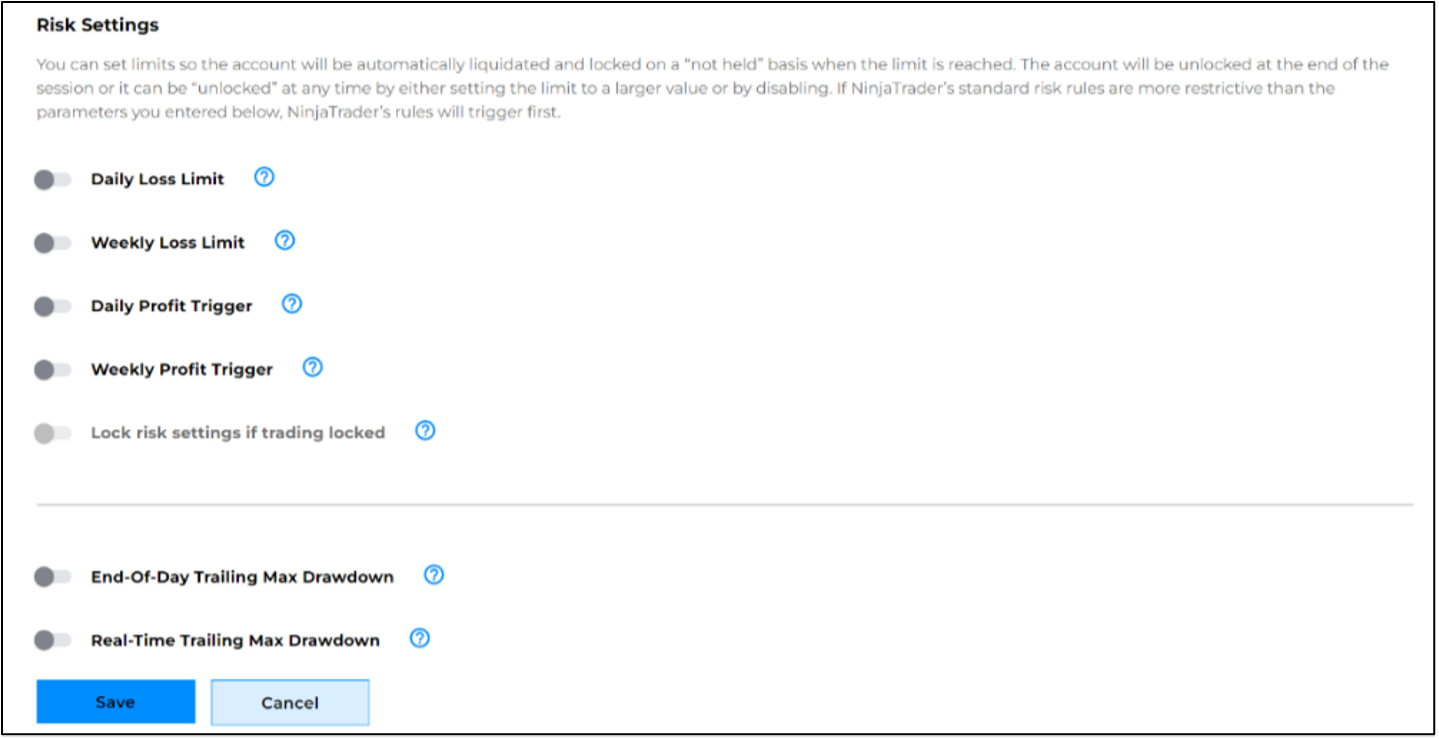
Figure 1: The redesigned NinjaTrader risk settings dialog
Learn how to set and manage your account risk settings.
Per-trade risk settings
Account-level limits watch your whole account. A stop-loss order watches one position you’ve chosen to protect. In between sits a set of rules that apply to every trade you take, without attaching anything to the order.
-
Max Loss Per Trade: One undisciplined trade can outweigh a dozen good ones. You’ll be alerted when your maximum loss is reached, which can help you stick to your plan while staying in control of every decision.
-
Max Profit Per Trade: Knowing when to exit can be just as important as knowing when to enter. When your profit target is reached, you’ll have the opportunity to exit your position or stay with the trend.
-
Max Time in Trade: Not every trade deserves more time. When your planned holding time expires, you can reassess your position with a fresh perspective.
You’ll find these three in the NinjaTrader Web App. The difference between these and the account-level settings above is what happens when you reach the line. Those settings act on your whole account—liquidating positions, locking your account, or blocking orders. These three don’t. They alert you when a single trade hits a line you set, but leave the action in your hands.
For a walkthrough of every account risk setting—where each one lives and what it does—see our NinjaTrader risk settings guide.
Trade-level stop-loss orders
Every time you get into your car, you have your planned route, check your fuel and mirrors, put on your seat belt, and off you go. On top of all that, you have car insurance just in case something goes wrong. Stop loss orders are your trading insurance, helping to protect your account from large losses.
Before placing a new trade, a trader must first try to determine the best correct stop loss amount to protect their capital and still give the market enough room for fluctuations without the position getting stopped out too early or too often. Only then can the trader set the correct trade size to stay within their account risk tolerance for a single trade.
Stop loss orders are typically stop market orders—these are conditional orders based on a selected stop price used to protect against losses on an open position. When placing a buy stop order to close a short position, the stop price must be above the current market price. And when placing a sell stop order to close a long position, the stop price must be below the current market price.
Whether you plan to be in a position for a few minutes or a few days, it’s always best practice to have an active stop loss order in the market for every open position. News events and other market conditions can turn a position against you on a dime, with devastating effects. Learn more about stop loss orders and which order types to use.
It is also important to remember that if you are holding a position overnight to set the trade duration on your stop loss order to good till cancelled (GTC).
Advanced trade management (ATM) strategies
When a trader places an order to enter a new position, they can attach additional advanced orders to the entry order to both capture profit and limit losses with one order. Depending on your trading style, these exit orders can be as simple as placing a stop loss and profit target bracket or a trailing stop. These types of exit orders can also be more complex, providing the flexibility to scale out of a position at different price levels or move a stop order to break even.
NinjaTrader Desktop offers advanced trade management (ATM) strategies to help manage:
-
Entry and exits with multilevel orders,
-
Automatic trailing and breakeven stops,
-
Multilayered bracket profit and stop levels.
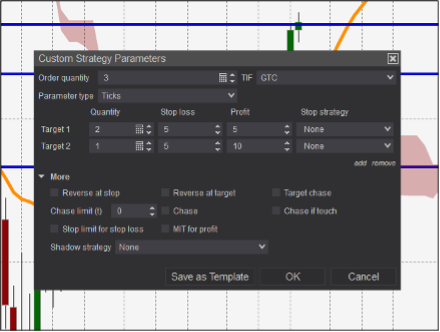
Figure 2: Advanced trade management (ATM) dialog to scale out of a position
These versatile strategies can be modified to accommodate trades of any quantity and can include as many stop loss and profit target levels as the trader requires and make it easy to take advantage of powerful order placement techniques to help better manage orders and positions and automate stops and targets. There are several preconfigured ATM strategies to use, and you can customize them for any trading scenario. Learn more about how to automate stops and targets with advanced trade management (ATM).
Trade scenario example
Let’s say you buy three contracts long in the Micro E-mini S&P 500 futures. With an attached ATM bracket strategy, the profit target and stop loss orders are automatically placed once the entry order is filled. If the profit target is hit first, the stop loss order is automatically cancelled. If the stop loss is hit first, the profit target order is also auto cancelled. This is called a bracket OCO (one cancels other) order. The profit target and stop loss orders can be set independently to different price levels as required.
Fixed fractional approach to trade sizing
Finally, any solid risk management in a futures trading approach considers both trade risk and account risk. Trade risk is the maximum amount you’re willing to lose on any one trade, and account risk is the consistent maximum percentage of your account you’re willing to risk on any one trade. To balance these two approaches, traders will often adjust their stop loss and trade size so that every losing trade will affect their trading account in a similar way. This concept is referred to as fixed fractional.
Fixed fractional is a mathematical formula that allows you to calculate an appropriate trade size for your account equity, risk tolerance, and maximum position stop loss on a single trade. If you determine your risk tolerance is 3%, this means you only want to lose a maximum of 3% of your account size on any one trade. With a 3% risk tolerance, it would take 23 losing trades in a row to lose half your starting account equity.
The lower your risk tolerance on each trade, the more likely you are to weather a significant account drawdown. Using fixed fractional will also help you determine which markets are more appropriate to trade for your available starting account balance. For example, if you have limited funds to start, trading micro contracts will give you more flexibility in trade sizing and stop loss amounts.
Fixed fractional trade size example
With a starting account of $10,000 and a maximum account risk percent of 3%, the maximum trade risk is $300 per trade. If you’re trading the MES Micro S&P 500 with a point value of $5:
-
Set maximum stop loss amount for 1 contract to $300 or 60 points.
-
Set maximum stop loss amount for 2 contracts to $150 or 30 points.
-
Set maximum stop loss amount for 3 contracts to $100 or 20 points.
In this example, each trade loses or is stopped out at $300, as the stop loss amount is reduced for increased trade size contracts. Choose the trade size that would give your position the best chance to avoid being stopped out with normal price volatility.
Get started on your path to learn how to trade futures
There are a variety of ways for futures traders to manage risk, and identifying an approach that fits your personality and trading approach is a critical component of any futures trading plan.
When starting out, trading in a simulated environment is one of the best ways to master risk management, gauge stop loss levels, and practice order placement without risking real dollars. Implementing a consistent risk management in your futures trading plan on every trade is the best way to help reduce the stress and loss of confidence that can come from one or more catastrophic losses. The goal here is to protect your trading capital so you can continue your futures trading journey.
For more tips, we’ve created a free multi-video trading course, “Develop the Trader in You,” to help guide new futures traders through the first critical stages as you get started. It also provides a roadmap for all the key learning points you’ll need to master. Watch Part 1.
Simulated trading is based on hypothetical results and does not reflect actual trading. Emotional and psychological factors of real money risk are not replicated. Use simulated trading to learn the platform and markets—not as an indicator of live performance.
Start trading futures with NinjaTrader
NinjaTrader supports futures traders worldwide with our award-winning trading platforms, world-class support, and futures brokerage services. The NinjaTrader desktop platform is free to use for advanced charting, strategy backtesting, technical analysis, and trade simulation.
Get to know our:
-
Futures brokerage: Open an account size of your choice—no deposit minimum required*—and get free access to our desktop, web and mobile trading platforms.
-
Free trading simulator: Sharpen your futures trading skills and test your ideas risk-free in our simulated trading environment with 14 days of livestreaming futures market data.
*ACH and debit card transfers are subject to a $5.00 minimum.
Better futures start now. Open your free account to access NinjaTrader’s award-winning trading platforms, plus premium training and exclusive daily market commentary.
NinjaTrader was recognized as the “Best Futures Broker” by BrokerChooser for 2025 and 2026 and “Best Broker for Trading Micro Gold (MGC) Futures” for 2026. BrokerChooser determines the ratings based on evaluation and real-account testing of brokers and investment platforms. NinjaTrader has a paid marketing relationship with BrokerChooser, but paid no application fee to earn this rating or otherwise participate in BrokerChooser’s independent methodology.
FAQs on futures risk management
How much of my account should I risk on a single futures trade?
That’s your account risk, and it’s a percentage you set rather than a number anyone can set for you. This article works through a 3% example: on a $10,000 account, 3% caps any one trade at $300. The lower the percentage, the more consecutive losses your account can absorb—at 3%, it would take 23 losing trades in a row to halve your starting equity.
How do I use my stop-loss to decide trade size?
Work backward from the dollar amount you’re willing to lose. With $300 of trade risk on the Micro E-mini S&P 500 at $5 a point, one contract gives you 60 points of room, two contracts gives you 30, and three gives you 20. Same risk, different distance. Pick the size whose stop distance gives the position room to breathe through normal volatility.
Do I need a stop-loss order on every futures trade?
It’s best practice to have an active stop-loss order in the market for every open position, whether you plan to hold for minutes or days. News events and sudden moves can turn a position against you quickly. If you’re holding overnight, set the order duration to good till cancelled (GTC) so it stays working between sessions.
What’s the difference between a stop-loss order and an account-level risk setting?
A stop-loss order is an order you attach to one position, resting in the market and closing that position at your price. An account-level risk setting is a rule the platform applies to your whole account—it watches your daily or weekly realized profit and loss and can liquidate positions and lock you out once you hit the limit you set. Most traders use both: the order helps manage risk on the trade, and the setting helps manage risk for the day.
Can I practice risk management in simulated trading?
Yes, and it’s a common use of a simulated environment. You can test stop-loss placement, work out position sizes, and get a feel for your own limits without risking real dollars. The habits transfer; the losses don’t.
Simulated trading is hypothetical and does not reflect actual trading or real-world results.