NinjaScript is the coding language that powers customization in NinjaTrader. For the average trader, it’s a way to adjust how your charts look, how your indicators behave, and how the platform responds to market activity.
You don’t need to be a programmer to use NinjaScript; many traders use it to make small tweaks and build simple tools that support their workflow. However, having a basic understanding of C# will help you get the most out of NinjaScript and our documentation.
Let’s explore how NinjaScript gives you room to experiment and shape the platform around how you trade, so you can grow your skills at your own pace.

What can you do with NinjaScript?
NinjaScript opens the door to a range of advanced customization within NinjaTrader. It extends the platform’s core capabilities, allowing you to modify existing tools and build new ones that support your trading style. You can use it to:
- Build custom indicators for specialized market analysis.
- Create automated strategies to help you react to market conditions.
- Design alerts, drawing tools, and chart behaviors tailored to your approach.
- Work with extended data inputs (e.g., multi-series, multi-timeframe logic).
- Construct add-on windows with your own tools that utilize NinjaTrader’s data and order delivery.
Because NinjaScript uses standard C# syntax, experienced developers can move quickly, while traders new to coding can learn through starter templates and simple examples. It’s designed to support you at any level—whether you’re making small refinements or exploring more advanced automation.
For beginners: Getting started with NinjaScript
Want to create your first indicator? NinjaScript offers a clear starting point so you can begin experimenting with confidence.
Where to find the NinjaScript Editor
On the NinjaTrader Desktop, open the NinjaScript Editor from the Control Center (New → NinjaScript Editor). This is your main workspace for writing, saving, and organizing code. The editor displays your scripts in a clean, structured format so you can easily navigate indicators, strategies, and supporting files. You can also compile your work directly in the editor, which can help you test changes quickly as you learn.
Building your first custom indicator
Most new users begin by modifying a simple indicator. For example, you can adjust a moving average to display custom colors, add extra plot lines, or include basic rules that change how the indicator reacts to price movement. These small steps can help you understand how NinjaScript components fit together. NinjaTrader includes sample scripts that show real working code, giving you a starting point for understanding structure, syntax, and common patterns.
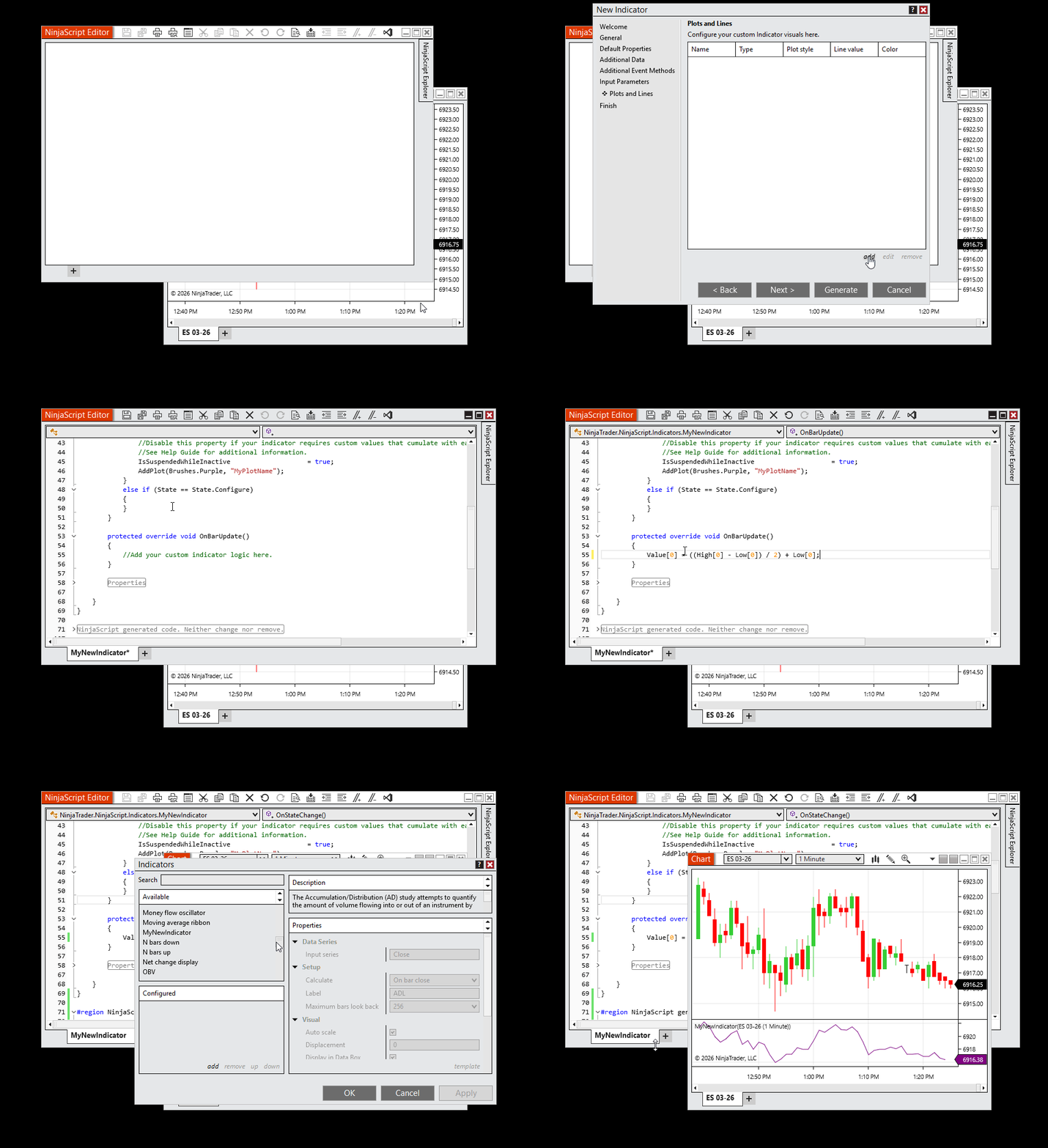 Figure 1: Creating a new indicator in the NinjaScript Editor. After selecting New Indicator, the NinjaScript Wizard opens to create a sample plot and generate the script. Once generated, the script can be edited directly in the Editor. The GIF shows custom code being added to a code block, compiling the script, and adding the indicator to a chart for testing.
With these fundamentals in place, you can start exploring how NinjaScript can help you customize your trading environment one small step at a time.
For intermediate users: Modifying and combining indicators
Once you’re comfortable with the basics, you can begin enhancing indicators and blending multiple data points into a single tool. At this stage, many traders experiment with logic changes that can help them view the market in new ways and streamline how they interpret chart information.
Modifying an existing indicator
A common next step is adjusting logic inside a familiar indicator. This can be as simple as adding visual cues or refining how the indicator responds to price movement. For example, you can add conditions that highlight crossovers, change plot styles, or incorporate additional smoothing to help you read trends more clearly. Small modifications like these can help you understand how inputs, calculations, and chart outputs work together inside NinjaScript.
Combining multiple inputs
As you progress, you can also merge data from different indicators and pull in secondary timeframes to expand your analysis. These combinations can help you create tools that present more context, such as confirming trend direction with higher timeframe data or pairing momentum signals with volatility measures. Blending inputs in this way can help you develop indicators that reflect how you interpret the markets.
As you work through these intermediate concepts, you’ll gain the confidence to build richer, more flexible tools that support your evolving trading approach.
For advanced programmers: Full customization and automation
As you gain experience with NinjaScript, you can begin exploring more powerful capabilities built into the framework. Advanced users often focus on automation, data integration, and expanded market context—areas where NinjaScript can help you create highly customized tools for your trading workflow.
Building fully automated trading strategies
NinjaScript allows you to design end-to-end trading logic that responds to real-time market conditions. You can define entry and exit rules, build risk management steps, and set conditions that guide how a strategy behaves throughout a session.
Many users start by converting a manual approach into structured logic, then refine it as they test how the rules behave under different price environments. Automated strategies can include layered conditions, event handling, and customized order management routines that support more advanced system design.
Using multi-timeframe analysis
Advanced traders often rely on multiple timeframes to add context to their decision-making. NinjaScript allows you to include secondary and tertiary data series inside a single script so you can compare trends, signals, and volatility across different intervals. This structure can help you design strategies that confirm short-term activity with broader market trends and create indicators that reflect conditions across multiple time horizons. Multi-timeframe logic follows a clear, organized pattern in NinjaScript, making it easier to experiment and refine as your ideas evolve.
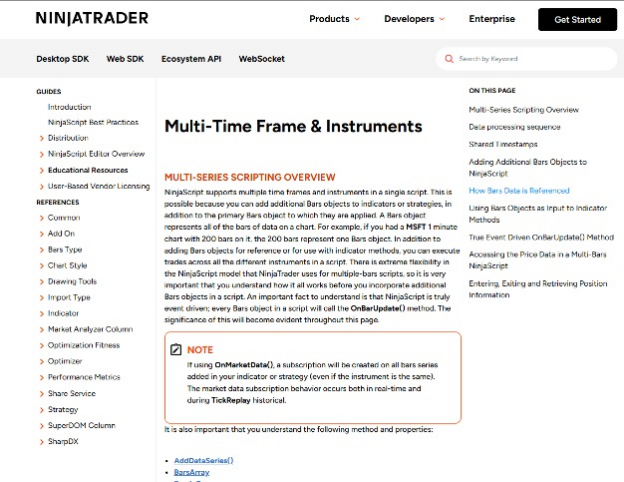 Figure 3: Multi-Timeframe & Instruments overview page
As you explore automation, data integrations, and multi-timeframe logic, you can gain the flexibility to build more sophisticated tools that align with your evolving approach to trading.
Education and other resources
Your NinjaScript journey doesn’t end once you build your first indicators and strategies. As you continue exploring what’s possible, ongoing learning can help you deepen your understanding, refine your workflow, and discover new ways to customize NinjaTrader to your trading preferences.
Keep developing your skills at your own pace with:
With resources like these at your fingertips, you can build your knowledge and refine how you work with NinjaScript as your trading journey progresses.

Take the next step with NinjaTrader
Ready to put your trading ideas into action with your own custom indicator? Download NinjaTrader and explore automated strategy development with NinjaScript today.