A stop order, or stop-market order, is a basic order type which issues a market order once a specified price has been reached. This price level is known as the stop price, and when it is touched or surpassed, the stop order becomes a market order.
Stop order and stop-market order mean the same thing. The “market” in the name tells you what the order becomes once your stop price is hit—a market order, not a limit order.
Stop orders provide a greater probability of achieving a trade at a predetermined entry or exit price. In other words, stop orders are not used solely for exiting positions and can be beneficial for entries as well. When entering a position, traders use stop orders to determine where a market order should be triggered. Conversely, traders also use stop orders for exiting trades to help limit losses or help hold onto profits.
How does a stop order work?
A stop order waits. You name a price, and until the market gets there, your stop can’t fill—it’s an instruction on standby, not an order competing for a fill. Reach that price and the stop becomes a market order, filling at market—whatever that happens to be right then.
Trigger first, execution second. That sequence is why your stop price sets where the order fires, not what you get for it. The two can land on the same number. In fast markets, they often don’t.
Buy stop order vs. sell stop order
A buy stop order must be entered above the current market price, and a sell stop order must be entered below the current market price. If the stop price is not touched by the market’s current value, no market order will be issued. Once the stop price is touched, a market order will be issued and filled at the best possible price at the time.
How Stop Orders Trigger
A stop order activates when a trade occurs at or through your stop price — not simply when the bid or ask moves past that level. In active futures markets, trades happen constantly, so this distinction rarely matters: price reaching your stop and a trade occurring there essentially happen at the same moment.
In quieter markets, the two can diverge. Bid and ask prices can shift as traders cancel or adjust resting orders, even when no trade takes place. If no trade prints at your stop price, the order hasn’t triggered yet — even if the market appears to have moved past that level. Learn more about how market conditions affect order behavior.
Once a qualifying trade occurs, the order triggers and is submitted as a market order, filling at the best price available at that moment.
Advantage of stop orders
Stop orders provide traders with the ability to specify a price where the order will be triggered. Once the market reaches this stop price, the order then activates and will execute as a market order.
Since market orders will always be filled at the best possible price, a trader can effectively get out of a losing trade using a stop-market order.
Disadvantage of stop orders
Although stop-market orders will always be filled provided the stop price is hit, the resulting market orders do not guarantee price and therefore do not allow any precision in order entry.
While the order will be filled at the best available price at the time, the execution price may be different than the last quoted price. In fast moving markets, the execution price could be much different than what the trader expected.
Examples of stop orders
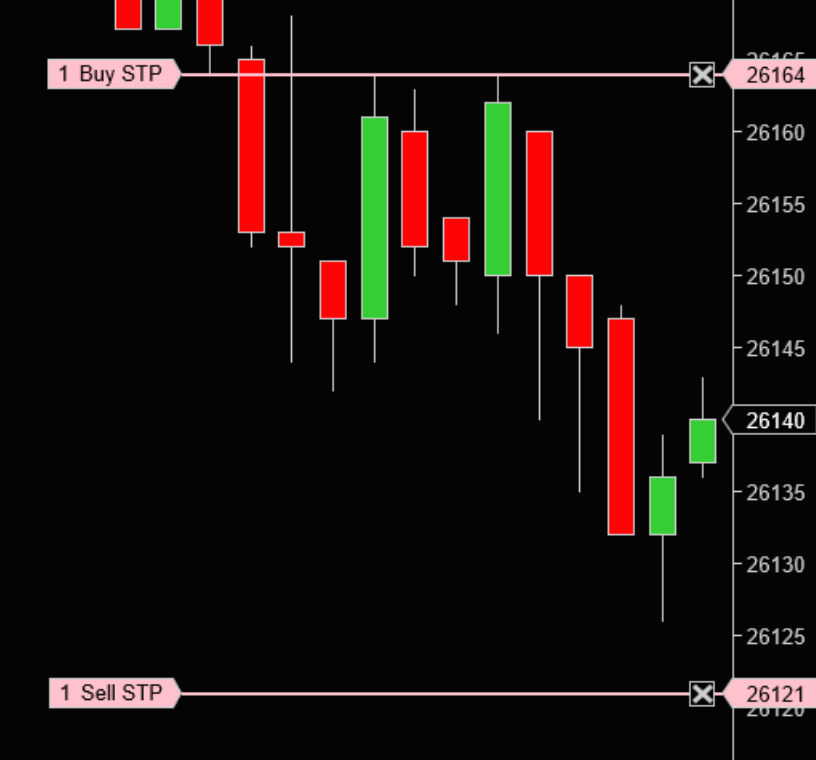
From the E-mini Dow (YM) chart above, with the market currently trading at 26140, the buy stop order at 26164 would require the market to move up to 26164 to trigger and would then issue a buy market order.
On the other hand, the sell stop order at 26121 would require the market to move down to 26121 to trigger and would then issue a sell market order.
Stop order vs. stop-limit order: what’s the difference?
Traders often confuse a stop order with a stop-limit order. Both use a stop price as a trigger. What differs is the order that gets sent once that trigger is hit—and that single difference changes what you can count on.
A stop order sends a market order, so you’ll typically get out, but the price isn’t fixed. A stop-limit order sends a limit order, so the price is capped, but the fill isn’t.
| Stop (stop-market) order | Stop-limit order | |
|---|---|---|
| Order sent at trigger | Market order | Limit order |
| Fill | Typically results in an exit once triggered, at the best price then available | May go unfilled if price moves past your limit |
| Price control | None—fills at the best price available | Capped at your limit price or better |
| Main risk | Slippage in fast or thin markets | No fill, leaving the position open |
| Typical use | Exits where getting out matters most | Entries and exits where price precision matters most |
For a fuller side-by-side that also covers trailing stops, see our comparison of stop-market vs. stop-limit orders. To see where both sit alongside market, limit, and bracket orders, start with our guide to futures order types.
Learn more about basic order types in this quick video overview:
The award-winning NinjaTrader platform supports both basic and advanced order types. Additionally, NinjaTrader is always free for advanced charting, strategy backtesting and trade simulation. Get started with our free trading simulator and explore the market possibilities!
Simulated trading does not represent actual trading and is based on hypothetical conditions. Actual trading results may differ significantly due to factors such as market conditions, liquidity, execution, and the emotional and psychological impact of risking real money. Simulated trading is provided for educational and platform-familiarization purposes only and should not be relied upon as an indication or expectation of results in a live trading environment.
Automating stop orders with NinjaTrader’s advanced trade management (ATM)
Until a stop is live in the market, it isn’t doing anything for you. Place one by hand after your entry fills and there’s a stretch—seconds, sometimes longer—where you’re in the trade with no exit working. NinjaTrader’s advanced trade management (ATM) removes that stretch: your stop reaches the market the moment your entry fills, resting at the trigger level you chose before the trade began.
Set your stop-loss and profit target in ticks, price, percent, or currency. Add a Stop Strategy and your stop can move to breakeven or trail automatically once your parameters are met. Save the whole setup as an ATM strategy template, and the one you use most is a single selection away.
Here’s how to preset a stop order and profit target with an ATM strategy.
Start placing stop orders with NinjaTrader
Knowing when a stop order fits is one thing. Having a platform that places and manages it for you is another. NinjaTrader supports stop and stop-limit orders in the SuperDOM and Chart Trader, and trailing stops through ATM Auto Trail. Open your free NinjaTrader account to put them to work.