Market Profile(™) is a unique charting tool that gives traders a fresh perspective of the two-way auction process driving all market movement. It can help individual traders identify patterns in herd behavior, leading to a better understanding of overall market sentiment. It’s useful in both short-term and long-term analysis.
The profile is built by plotting the volume of transactions at each price level, resulting in a histogram that shows how supply and demand interact to determine the market price. It updates dynamically with price and volume data to reveal ever-changing market conditions.
Learn the importance of Market Profile in this short video:
How to Use Market Profile in Futures Trading
Traders often use Market Profile to identify key price levels, where there are high concentrations of transactions. These concentrations can be used as potential support and resistance levels. The profile can also be used to identify periods of high or low activity, which can help clue traders in on potential turning points in the market.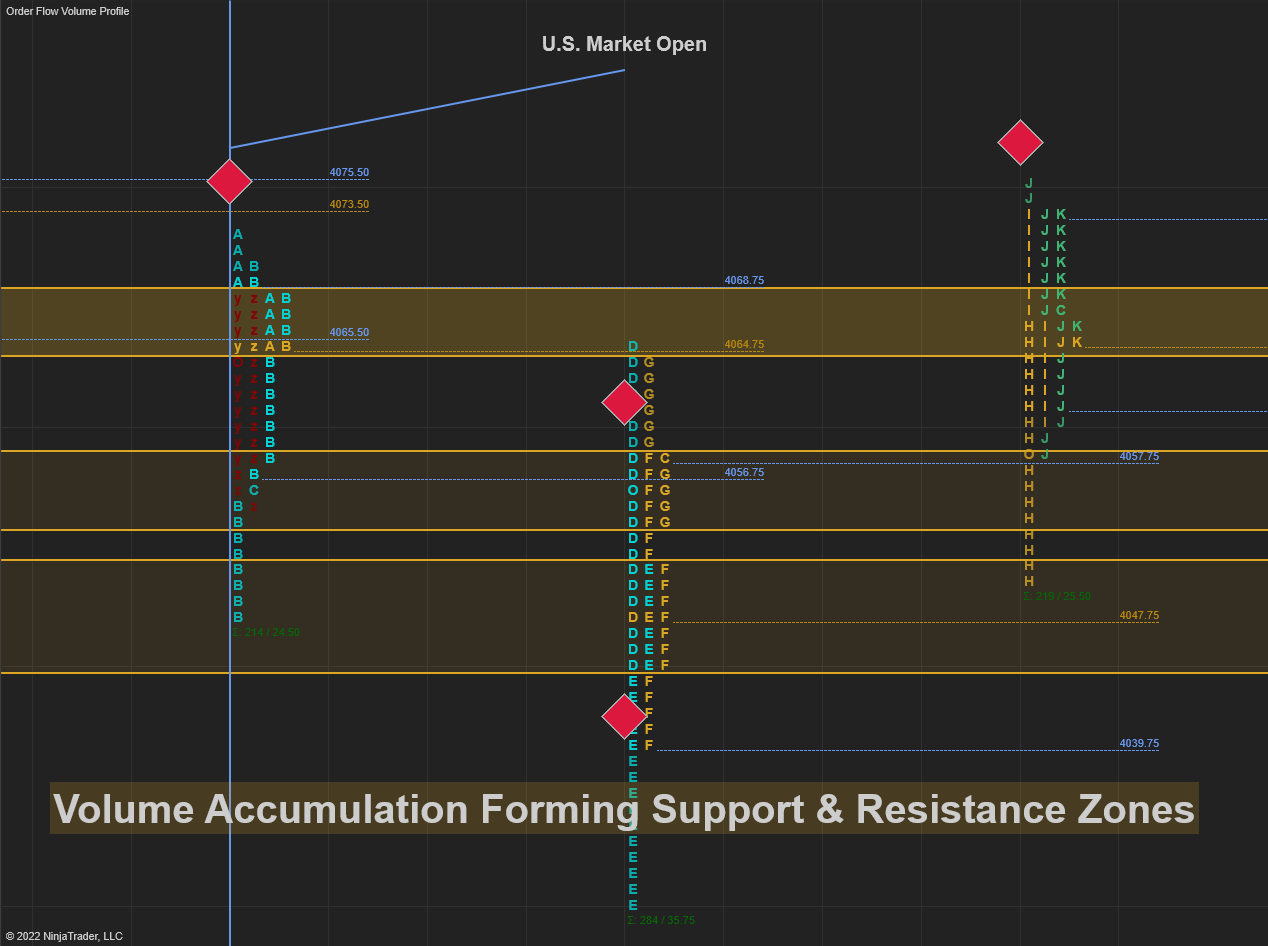
Market Profile accumulation forming support and resistance zones on a 240-minute E-mini S&P 500 chart.
The key to Market Profile’s popularity is its versatility. It can be used in all markets, and it fits well with many different trading styles. While it can be used in all time frames, it tends to work best on longer-term charts. Longer time frames offer more volume-at-price data, thereby revealing more concentrations and low-activity areas.
60-minute Market Profile (top) vs. 6-hour Market Profile (bottom)
Traders use Market Profile to:
- Understand what’s happening in the market as it’s happening.
- Identify patterns in the behavior of other market participants to help inform better trading decisions.
Candlestick Chart vs. Market Profile
The main difference between a candlestick chart and Market Profile™ is that a candlestick chart only shows the price action, while Market Profile™ shows both the price action and the order flow. Order flow is the net sum of all the buy and sell orders in the market.
This added dimension is also commonly referred to as Time Price Opportunity (TPO). Each TPO has three components: time value, price value, and volume.
- The time value is the amount of time that the market spends trading (is “willing” to spend trading) at a certain price.
- The price value is the price at which the market is trading (is “willing to trade).
- The volume value represents the success of the TPO.
120-minute Market Profile with hollow candlesticks overlaid. Much more information about market participation can be drawn from the Market Profile.
How to Read Market Profile Letters and Time Blocks
The letters on the Market Profile represent specific time windows. The capital “A-Z” letters correspond to half-hour increments starting at 9:00 am ET and ending at 9:00 pm ET. Conversely, the lowercase “a-z” letters represent the overnight trading session from 9:00 pm ET to 9:00 am ET. This can be helpful when looking at a larger time frame Market Profile histogram, such as a full day. Here’s a quick reference table for the letters.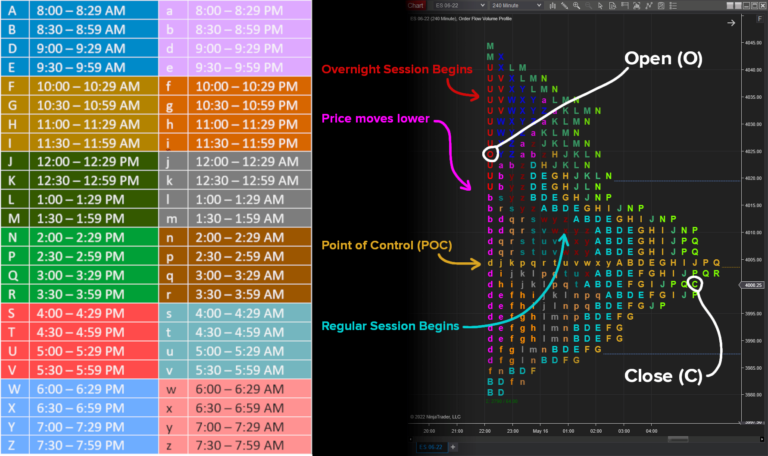 Notice that both “C” and “O” are omitted from the letters used. These special characters are reserved for the opening and closing of the time period. Notice also how trade volume moves across several price areas over time in the full session example shown above.
Add Market Profile to Your Trading
Market Profile is neither a holy grail, nor a silver bullet. But it is a powerful tool that can help traders make better decisions. It can be a great complement to other tools and techniques you may already be using, so try adding Market Profile to your existing trading setup to see if it helps you.
A whole suite of volume profile tools is included with the NinjaTrader platform’s order flow features. To add these to any chart within NinjaTrader:
- Right-click on the chart window and select Indicators.
- Locate Order Flow Volume Profile from the top left list and double-click it.
- Set Profile type to Price and set Draw mode to Letters.
- Choose a reasonable Ticks per level value, such as 4 for the E-mini S&P 500.
- Set Profile period to Bars and the Bars value below as desired.
- A reasonable starting point is a 30- or 60-minute chart, with Bar values ranging from 1 to 6.
- Optional: Select the Hide Bars option under Visual.
Explore Market Profile Tools in NinjaTrader
NinjaTrader supports more than 2 million traders worldwide with a powerful and user-friendly trading platform, discount futures brokerage, and world-class support. NinjaTrader is always free for advanced charting and strategy backtesting through an immersive trading simulator..
Download NinjaTrader’s award-winning trading platform and get started with a free trading demo with real-time market data today!
** “Market Profile” is a registered trademark of the Board of Trade of the City of Chicago. Use of the term “Market Profile” in this article is for educational purposes only.