A stop-limit order is a basic order type which issues a limit order once a specified price has been reached. This price level is known as the stop price, and when it is touched or surpassed, the stop-limit order becomes a limit order.
Stop-limit orders are conditional orders which combine the features of stop orders with those of limit orders. Stop-limit orders are not used solely for exiting positions and can be beneficial for entries as well. When entering a position, traders use stop-limit orders to determine where a limit order should be triggered. Conversely, traders also use stop-limit orders for exiting trades to help minimize risk and book profits.
How does a stop-limit order work?
A stop-limit order carries two prices, and they do different jobs. The stop price is the trigger—the level that wakes the order up. The limit price is the boundary—the worst fill you’re willing to take once it does. In NinjaTrader, you set that boundary as a tick offset from the stop price.
Nothing happens while the market sits away from your stop. Touch it, and a limit order goes to the exchange at your limit price or better. From there it behaves like any limit order: it fills if the market comes to it, and it waits if the market doesn’t.
Buy stop-limit order vs. sell stop-limit order
A buy stop-limit order must be entered above the current market price, and a sell stop-limit order must be entered below the current market price. If the stop price is not touched by the market’s current value, no subsequent limit order will be issued.
Once the stop price is touched, a limit order is issued at a predefined number of ticks away from the initial stop price. This combines the features of a stop order with those of a limit order.
Advantage of stop-limit orders
The main benefit of using a stop-limit order is the precise control the trader has over where an order should be executed.
Stop-limit orders provide traders with the ability to specify a price where a limit order will be triggered. Once the market reaches this stop price, a limit order with a predefined number of ticks away from the stop price is then issued to the exchange.
Disadvantage of stop-limit orders
While stop-limit orders offer precise control over where orders will execute, they do not guarantee a fill.
If the security does not reach the specified stop price, no limit order will be issued to the exchange. Additionally, even if the stop price is reached and the limit order is issued, it will only fill if the market reaches the limit price with enough volume.
In this sense, opportunities to enter or exit the market could be missed with stop-limit orders.
Examples of stop-limit orders
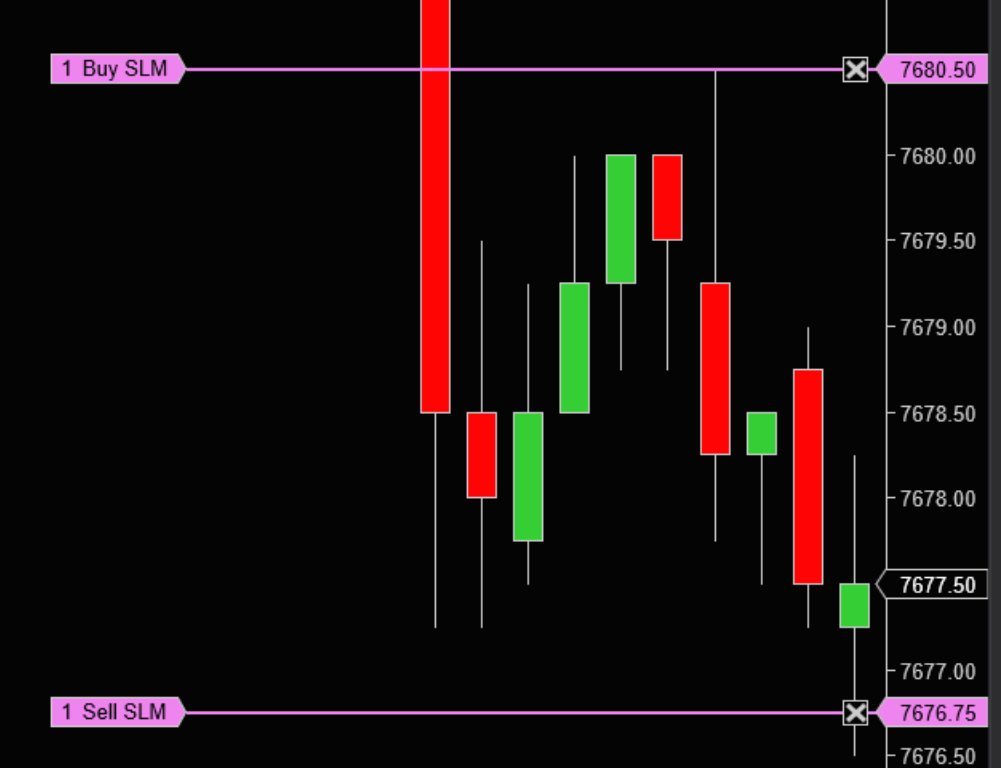
From the E-mini Nasdaq 100 futures (NQ) chart above, with the market currently trading at 7,677.50, the buy stop-limit order at 7,680.50 would require the market to move up to 7,680.50 to trigger and would then issue a buy limit order.
On the other side of the market, the sell stop-limit order at 7,676.75 would require the market to move down to 7,676.75 to trigger and would then issue a sell limit order.
Stop-limit order vs. stop order: what’s the difference?
Both orders open the same way. You name a stop price, and nothing happens until the market reaches it. The split comes at the trigger: a stop order hands the rest to the market, while a stop-limit order keeps a hand on the wheel—you’ve already said how far you’re willing to go.
That control is the entire argument for a stop-limit. It’s also the entire risk. Naming your worst acceptable price means accepting that the market can move past it without you.
| Stop-limit order | Stop (stop-market) order |
Order sent at trigger | Limit order at your limit price or better | Market order |
What you control | The worst price you’ll accept | The trigger level only |
What you give up | Certainty that the order fills | Certainty of the price you get |
If price gaps past your level | Order rests unfilled and the position stays open | Fills at the best price then available |
Best suited to | Orderly, liquid conditions where price is unlikely to run | Fast or thin conditions where exiting matters most |
For a fuller side-by-side that also covers trailing stops, see our stop-market vs. stop-limit comparison.
Learn more about basic order types in this quick video overview:
The award-winning NinjaTrader platform supports both basic and advanced order types.
NinjaTrader is always free for advanced charting, strategy backtesting and trade simulation. Get started with a free 14-day market data trial when you open an account, and try our free trading simulator to explore market opportunities.
NinjaTrader was recognized as the “Best Futures Broker” by BrokerChooser for 2025 and 2026 and “Best Broker for Trading Micro Gold (MGC) Futures” for 2026. BrokerChooser determines the ratings based on evaluation and real-account testing of brokers and investment platforms. NinjaTrader has a paid marketing relationship with BrokerChooser, but paid no application fee to earn this rating or otherwise participate in BrokerChooser’s independent methodology.
Simulated trading does not represent actual trading and is based on hypothetical conditions. Actual trading results may differ significantly due to factors such as market conditions, liquidity, execution, and the emotional and psychological impact of risking real money. Simulated trading is provided for educational and platform-familiarization purposes only and should not be relied upon as an indication or expectation of results in a live trading environment.
Choosing a stop-limit order in NinjaTrader’s advanced trade management (ATM)
An advanced trade management (ATM) strategy submits your stop-loss and profit target the moment your entry fills. Building one means choosing what kind of stop that will be—and a stop-limit is one of the options.
Choose it, and the tradeoff comes with you into automation. Your stop rests at a price you defined before the trade started, and it holds that price whether or not the market cooperates. That fits a strategy built around defined levels in orderly markets. It fits volatile sessions less well: an ATM stop-limit that goes unfilled leaves the position open exactly as a manual one would. ATM strategies submit a stop-market order by default; a stop-limit is one of the alternatives you can select.
Here’s how to preset a stop-loss and profit target with an ATM strategy.
Start placing stop-limit orders with NinjaTrader
Price control only pays off if the order can be placed. NinjaTrader supports stop-limit orders in the SuperDOM and Chart Trader, and inside ATM strategies that submit them for you the moment you’re filled. Open your free NinjaTrader account to put them to work.
FAQs on stop-limit orders in futures trading
When should I use a stop-limit order instead of a stop order?
Use a stop-limit when the price you get matters more than the certainty of getting out. You name a limit, and the order won’t execute past it. Choose a stop order when the priority is exiting—it goes to market and takes what’s there. Liquidity and speed usually settle it: orderly, range-bound markets favor the stop-limit, and fast or thin ones favor the stop. Our stop-market vs. stop-limit comparison walks through each type in depth.
What happens if a stop-limit order doesn’t fill?
Nothing. Your limit order sits at the price you named while the market trades away from it, and the position stays open. There’s no automatic conversion to a market order. If the move keeps going, the loss you meant to cap goes with it. This is the risk to weigh around economic releases, session opens, and any moment when price jumps levels instead of walking through them.
Can you use a stop-limit order to enter a trade?
Yes. A buy stop-limit above the market can be used to enter long on a breakout while capping what you’ll pay for it, and a sell stop-limit below the market can do the same on a breakdown. The tradeoff is the one you accept on exits: name your price and the move can leave without you.
Can you automate stop-limit orders in NinjaTrader?
Yes. When you build an ATM strategy, you choose the stop type it submits, and a stop-limit is one of the choices. Your stop and profit target reach the market together the moment your entry fills, linked as a one cancels the other (OCO) pair, so whichever one fills pulls the other.